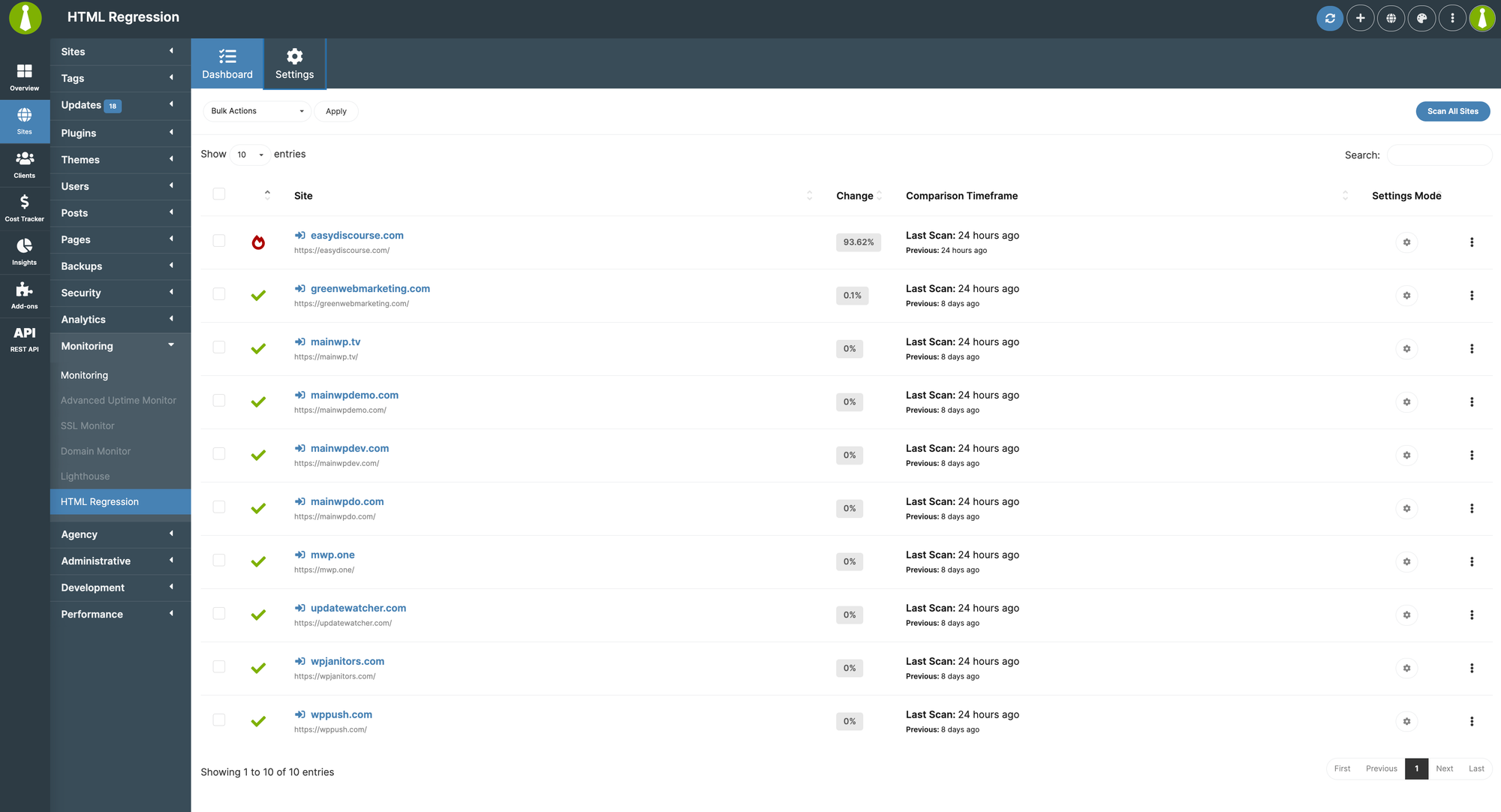
The Regression Testing extension for MainWP helps you monitor changes in your child sites’ source code. Any modifications to your site’s HTML output are detected and reported so you can catch unexpected changes.
What You’ll Learn
Configuring automated and manual HTML scans
Setting up post-update regression scans
Viewing raw HTML and rendered differences
Using change thresholds for notifications
Extension Add-on - This add-on provides standalone functionality within MainWP Dashboard. No third-party plugins required.
The Regression Testing extension for MainWP helps you monitor changes in your child sites’ source code. Any modification to a site’s HTML, whether from a plugin update, theme change, or a manual edit can introduce unexpected issues. This extension allows you to detect these differences early by comparing the most recent scan with the previous one.You can configure scans to run on a fixed schedule (daily, weekly, twice per month, or monthly) or automatically trigger them after an update to plugins, themes, or WordPress core. Once a scan is complete, the system evaluates the differences, and if the percentage change exceeds a defined threshold, an email notification can be sent to alert you.
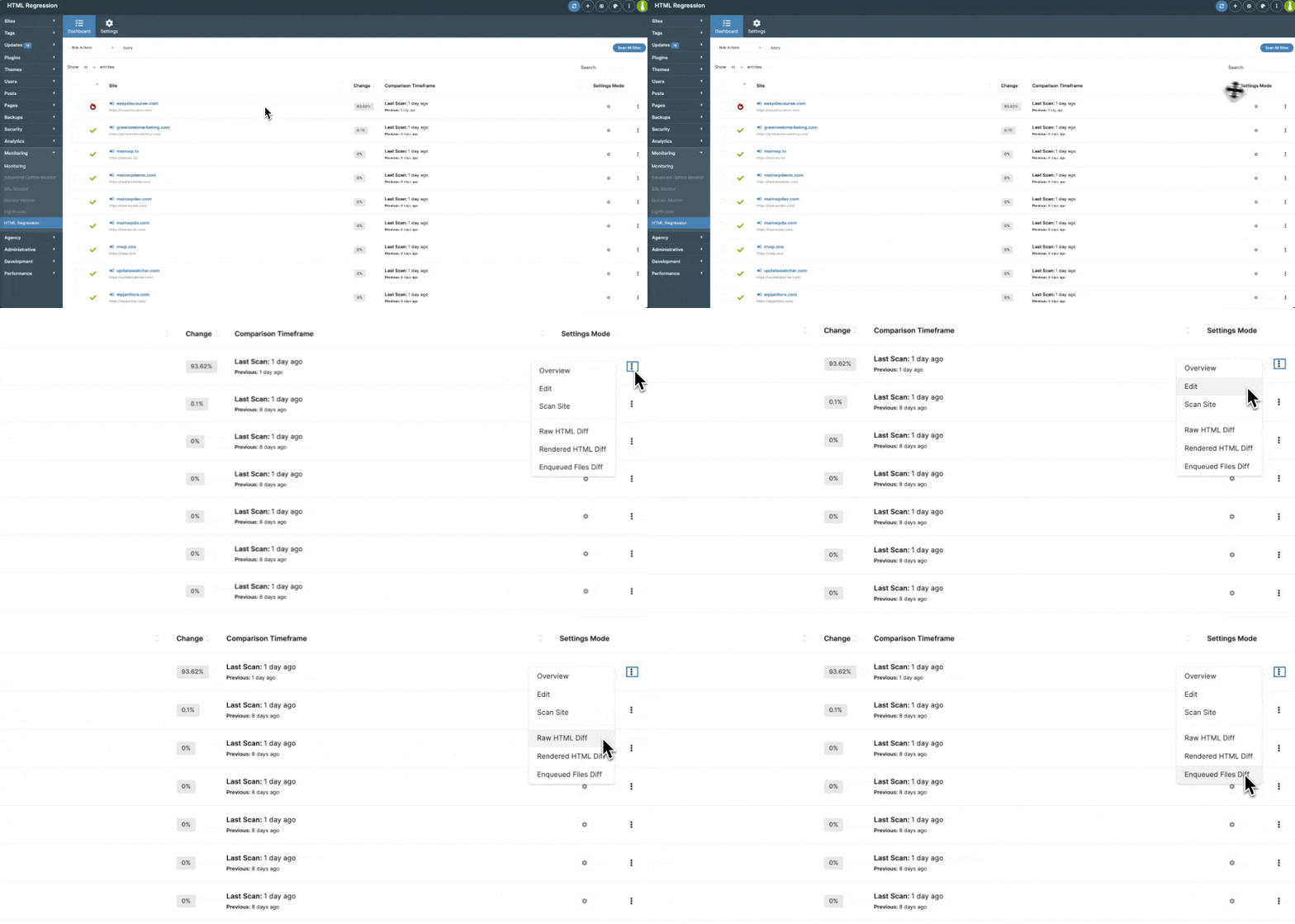
Regression Testing Dashboard
To open the add-on, go to MainWP > Add-ons > Monitoring > Regression Testing. The Dashboard page provides an overview of all connected child sites and their scan results.Each site in the list includes:• Site Name & URL – Click the site name to open its MainWP child site Dashboard.• Change Percentage – Displays how much the site’s HTML has changed since the last scan, giving you an immediate sense of whether an update introduced modifications.• Comparison Timeframe – Shows when the last two scans occurred.• Settings Mode – Lets you know if the site is using global settings or has custom, per-site configurationsAt the far right of each row, clicking the ellipsis menu (⋮) reveals additional options:• Overview – Opens the Overview page of this Child Site.• Edit – Opens the Edit page of this Child Site.• Scan Site – Manually trigger a new Regression Testing scan for the site.• Raw HTML Diff – View side-by-side changes in the site’s HTML code to detect structural modifications.• Rendered HTML Diff – See a visual before-and-after comparison to spot layout or content changes.• Enqueued Files Diff – Compare changes in CSS and JavaScript files if tracking is enabled in the Settings.
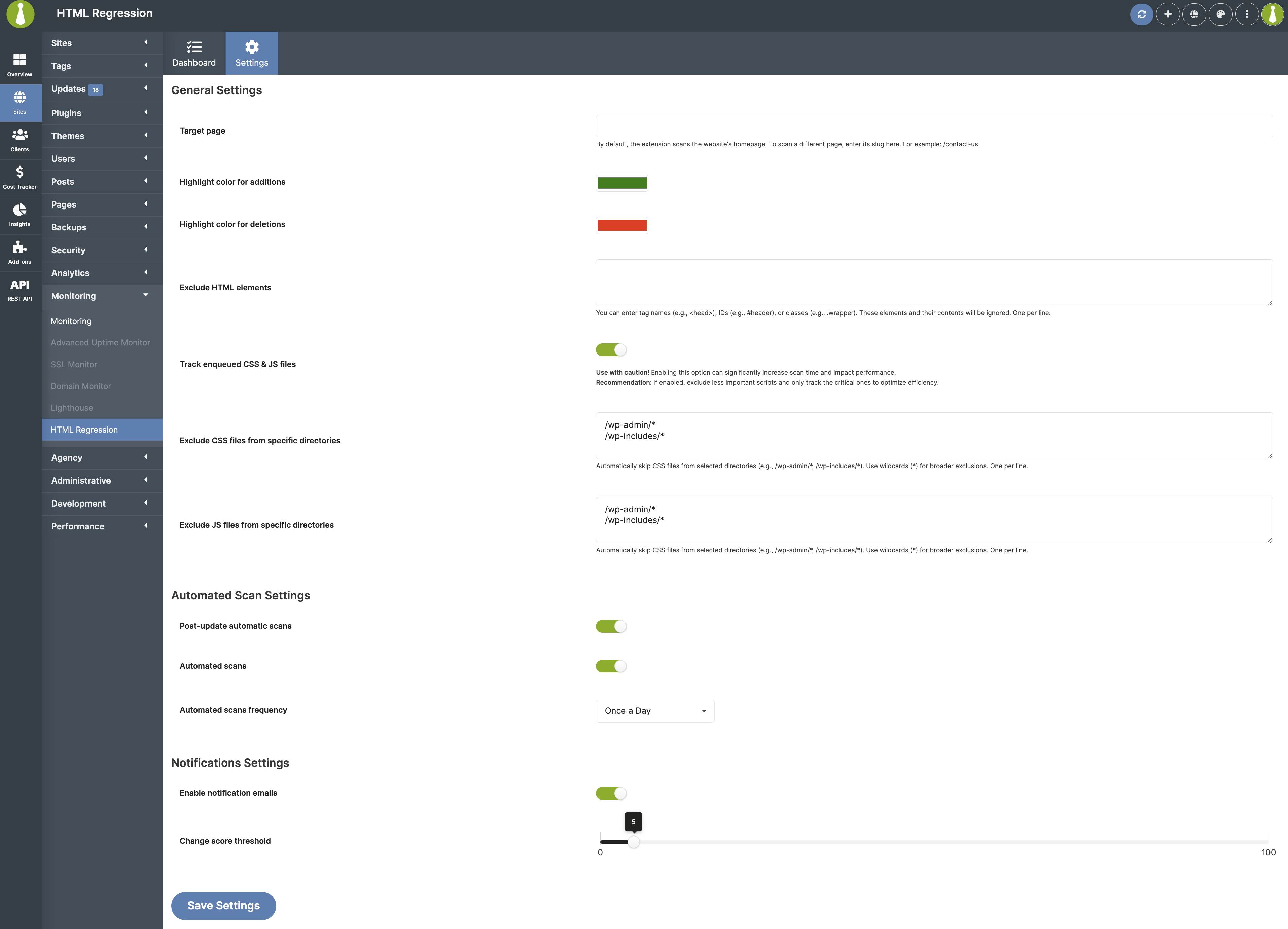
General Settings
To customize how scans are performed, navigate to MainWP > Add-ons > Monitoring > Regression Testing > Settings.• Additional target pages – By default, the add-on scans the site’s homepage on the / slug. If you want to scan another page, enter its slug, such as /contact-us. This is useful if a particular page, such as a pricing or checkout page, is more critical to monitor.• Highlight color for additions and Highlight color for deletions – Set custom colors to highlight added and removed content in difference views.• Exclude HTML elements – Specify elements to ignore, such as head, #header, or .wrapper.• Track enqueued CSS & JS files – If enabled, the add-on will also track changes to JavaScript and CSS files. However, this can significantly increase scan time.• Exclude CSS files from specific directories and Exclude JS files from specific directories – Prevent selected CSS or JS files from being included in the scan by specifying directories, such as /wp-admin/*.• Snapshot retention policy - Set how long HTML snapshots should be kept before they are automatically deleted. Choose from 1 day, 1 week, 2 weeks, 1 month, 2 months, 3 months, 6 months, 1 year, or unlimited. Default is 30 days. The Child Site Overview widget uses this retention window for its Change chart history.
Automated Scan Settings
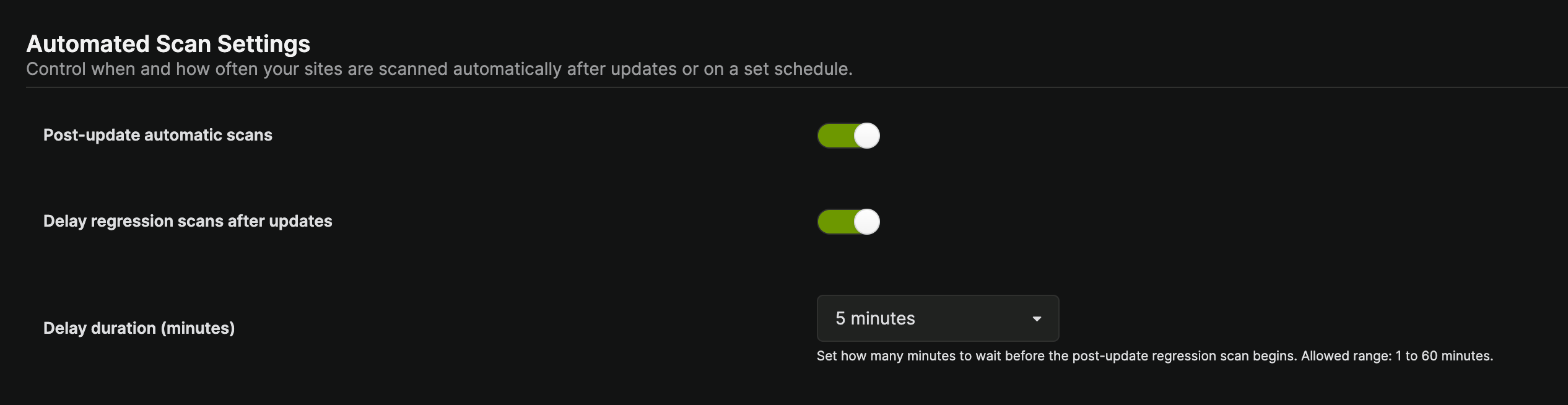
• Post-update automatic scans – Automatically perform a scan after a plugin, theme, or WordPress core update. After updates are finished on a Child Site, Regression Testing will begin automatically. The UI reflects this sequence, with status messages and icons that accurately indicate when an update or a regression scan is underway.• Delay regression scans after updates – When Post-update automatic scans are enabled, you can choose to delay the regression scan instead of running it immediately after updates finish. This gives caches, CDNs, page builders, and background processes time to settle before a snapshot is captured, reducing false positives caused by transient changes.
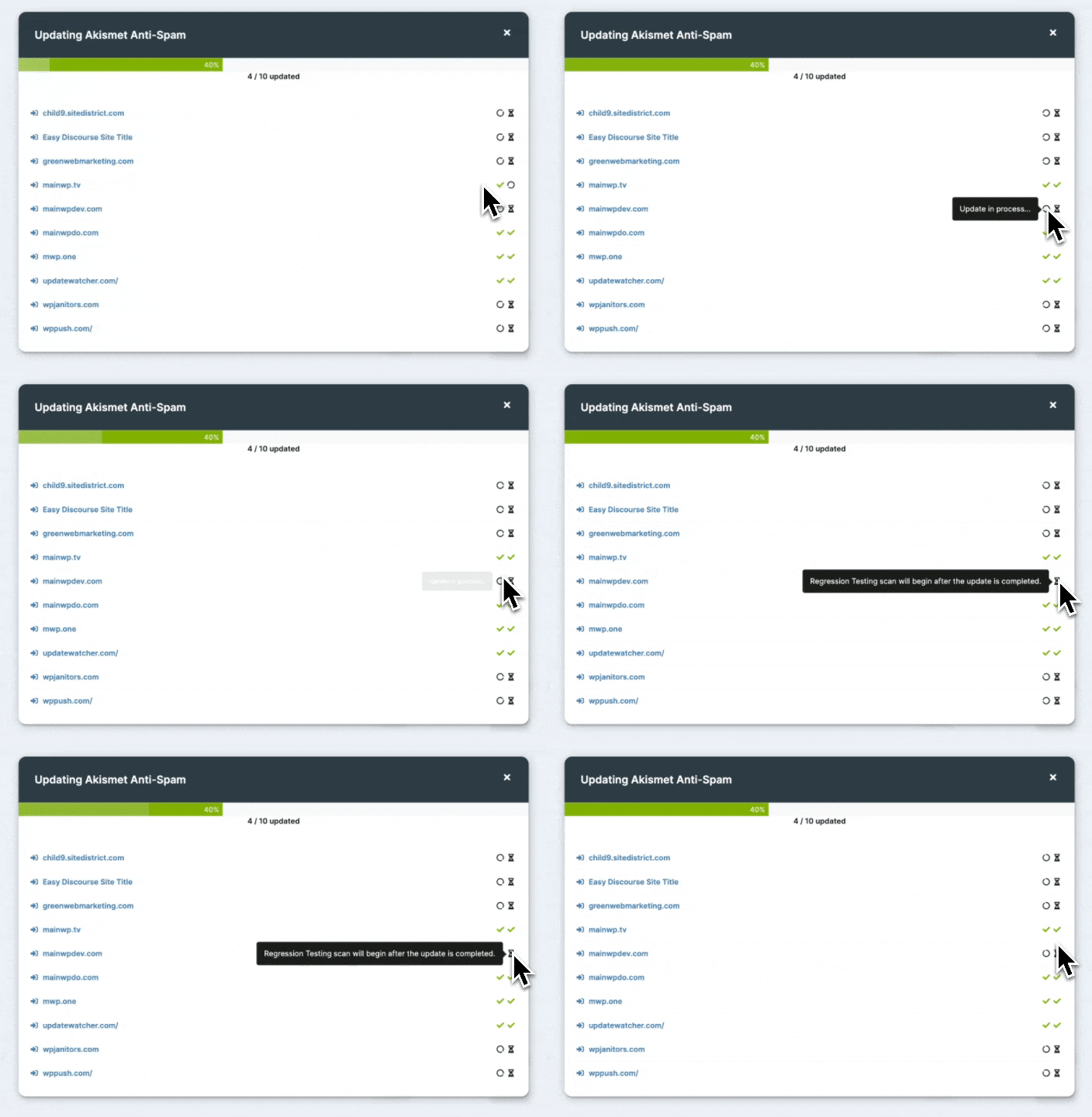
When enabled, set the Delay duration (minutes) to any value between 1 and 60 minutes. The post-update regression scan will be queued and begin once the delay has elapsed. If Post-update automatic scans are disabled, the delay setting is hidden and ignored.Use this when:
Your sites use full-page caching, object caching, or a CDN that needs time to refresh after updates.
Plugins or themes perform background tasks (e.g., asset rebuilding, cache warming) immediately after activation or update.
You want a more stable baseline by scanning after the site has stabilized post-update.
• Automated scans and Automated scans frequency – Choose how often automatic scans run: Once a day, Once a week, Twice a month, Once a month.
Notifications Settings
• Enable notification emails – Get an email alert if a site’s changes exceed a specified threshold.• Change score threshold – Set the percentage difference that triggers a notification.
If a child site has its own notification email recipients configured (see Per-site Settings), those recipients are used for that site’s alerts and override the general notification email settings. If no site-specific recipients are set, the general settings apply.
Per-site Settings
1
Go to the MainWP > Sites > Manage Sites page
2
Locate the desired child site and click on its name
3
Click Regression Testing in the sidebar on the left
4
Click the Settings tab
5
Enable Overwrite General Settings and click Save
6
Set your desired per-site preferences
7
Click the Save Settings button at the bottom of the page
Viewing Scan Results
1
Navigate to MainWP > Add-ons > Monitoring > Regression Testing
2
Locate the desired Child Site in the table, and then from the ellipsis menu choose:
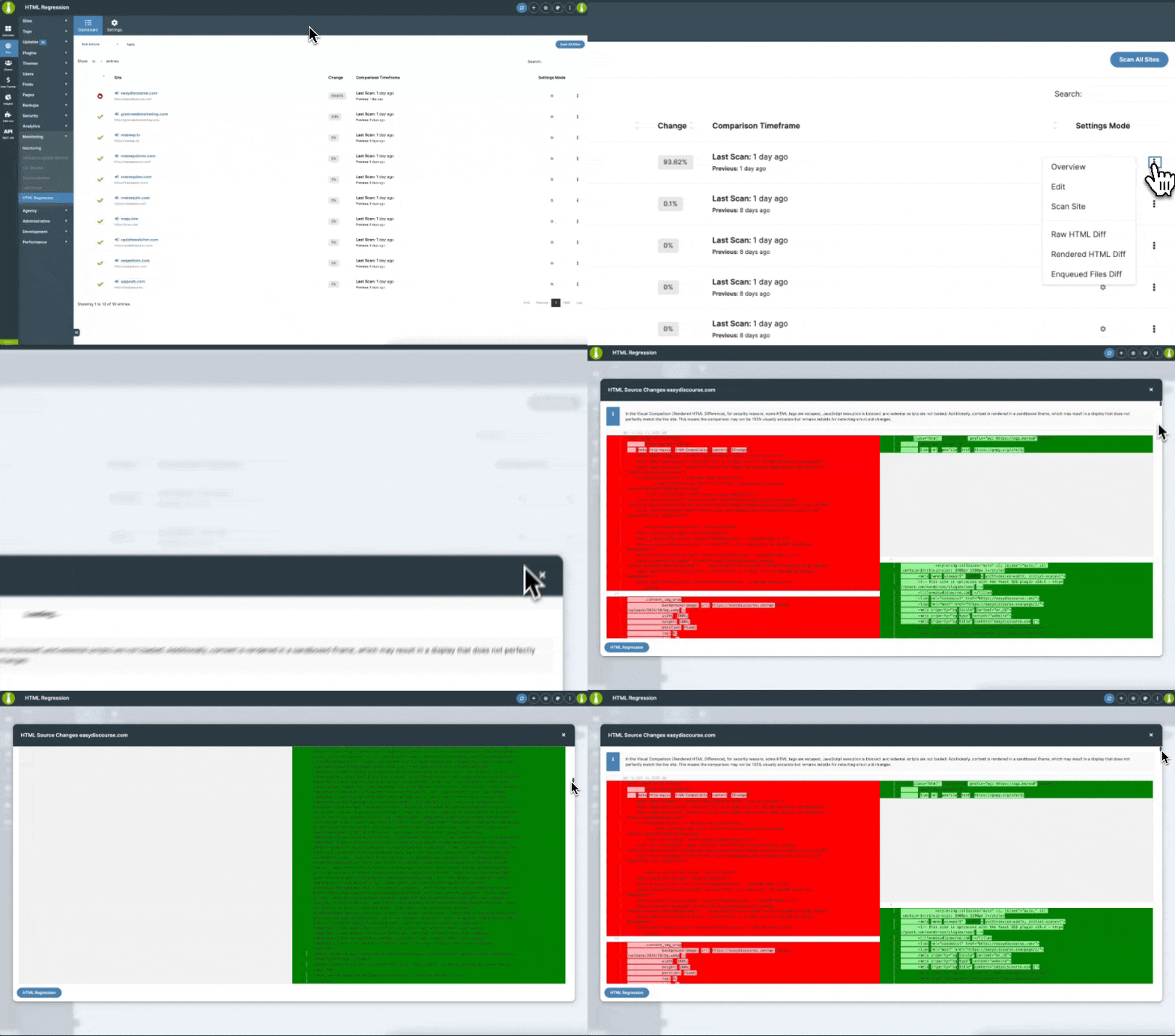
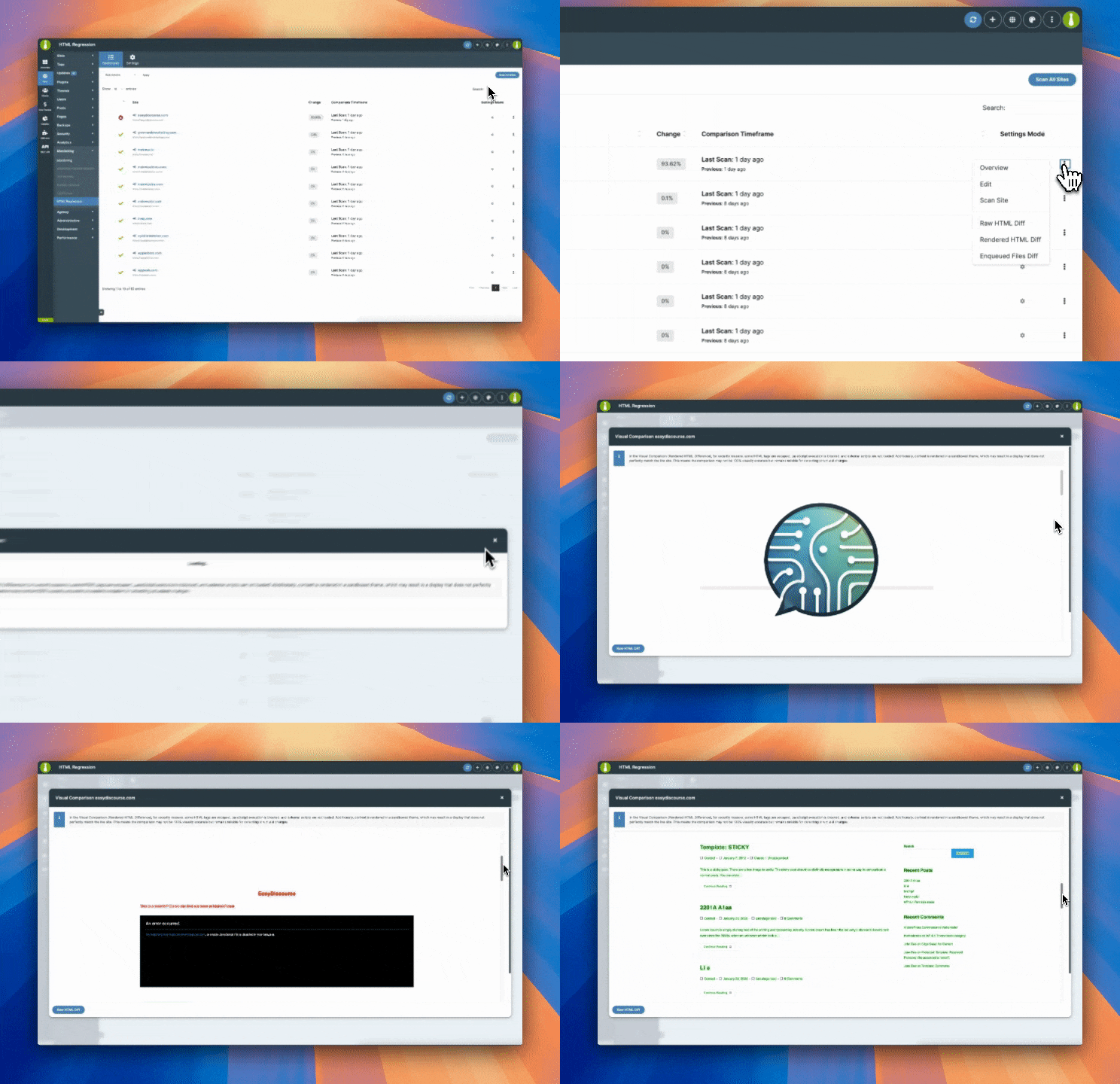
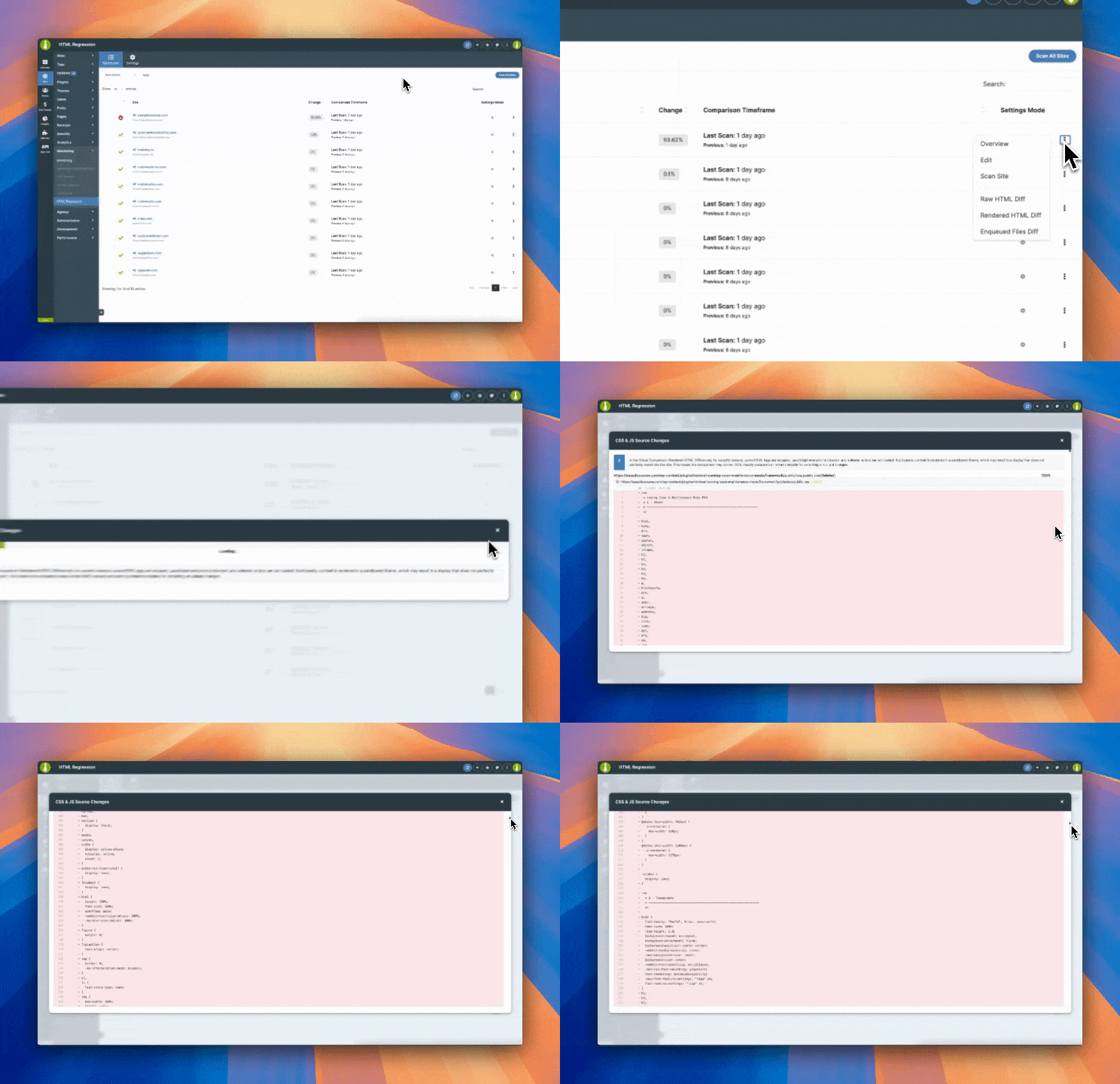
Raw HTML DiffProvides a side-by-side comparison of the site’s HTML between the last two scans. The left side displays removed elements, while the right side highlights newly added content. This helps detect missing sections, unexpected code injections, or unwanted structural modifications caused by updates.Rendered HTML DiffShows a visual before-and-after comparison of the site. This allows you to spot layout shifts, missing elements, or content changes. However, due to security restrictions, JavaScript execution is blocked, external scripts are not loaded, and some HTML tags are escaped. While the rendering may not be 100% accurate, it remains a reliable way to track unintended modifications.Enqueued Files DiffDisplays changes in CSS and JavaScript files if tracking is enabled in the settings. This helps you identify updates to stylesheets and scripts that might have affected the site’s design or functionality.Running a Manual ScanIf you need to check a site immediately, you can manually trigger a scan from the Regression Testing Dashboard by clicking the ellipsis menu and selecting Scan Site.You can also initiate a scan from an individual Child Site Overview Page under the Regression Testing tab. Manual scans are useful when performing maintenance or troubleshooting specific issues.
Widgets
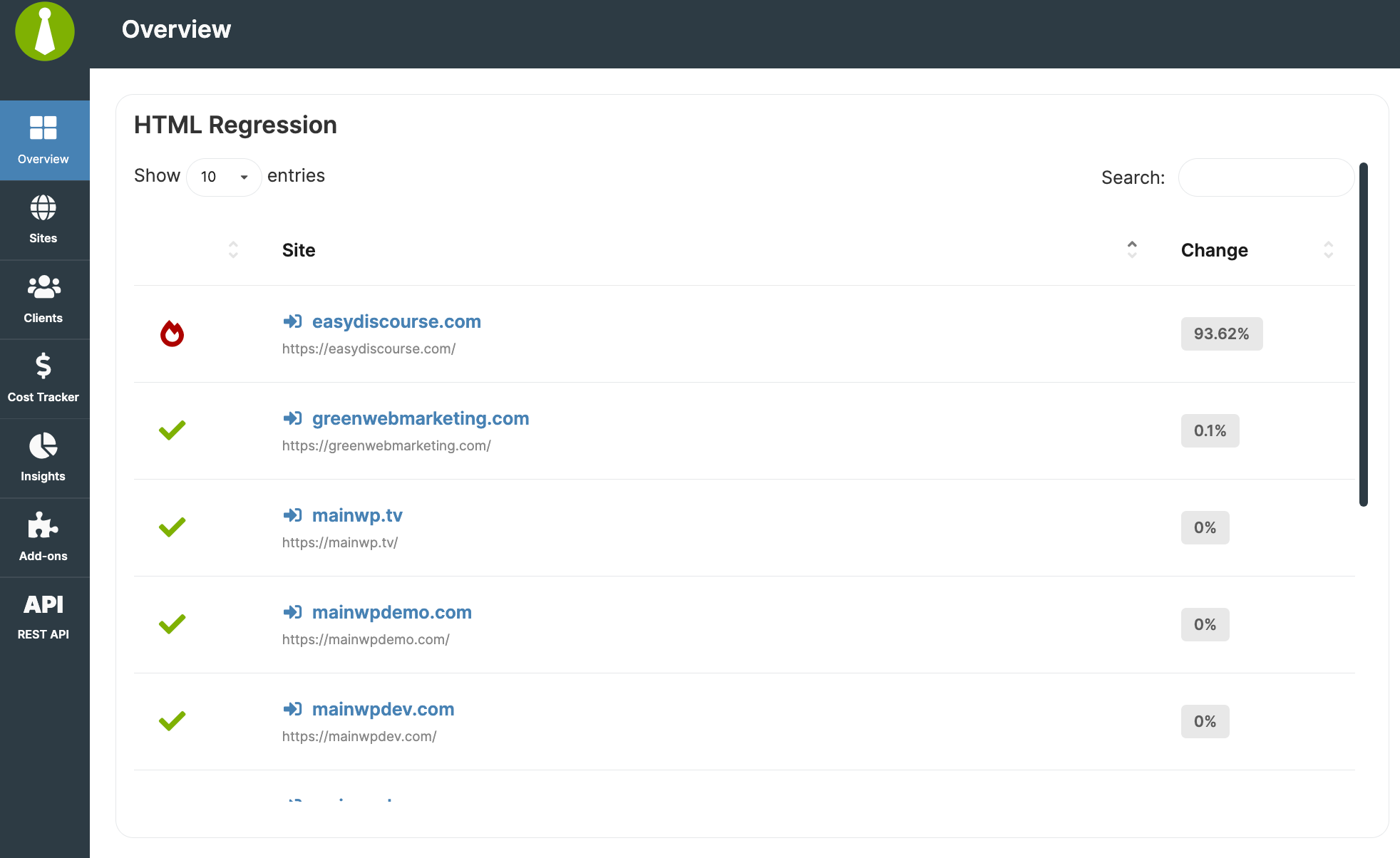
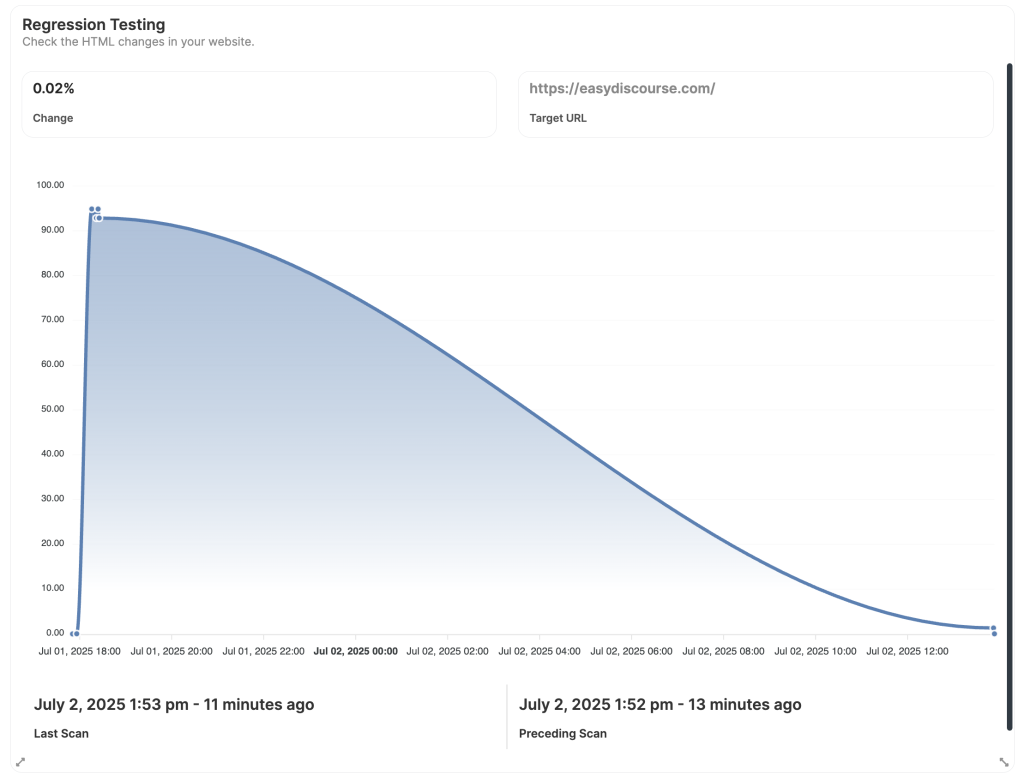
MainWP Overview Page WidgetThis widget offers a high-level summary of HTML changes across all connected child sites. It displays a list of sites where significant modifications have been detected, allowing you to identify potential issues at a glance. This is particularly useful for catching unexpected changes across multiple sites without needing to open each one individually.Child Site Overview Page WidgetOn an individual site level, the Child Site Overview Page Widget provides a quick way to review the latest scan results. It displays the most recent Change Percentage, the Target URL that was scanned, and the timestamp of the Last Scan. This allows you to monitor specific sites directly from their MainWP overview pages, making it easy to track and review unexpected modifications as they occur.The chart also includes timestamps on the x-axis and reflects the history of Change Percentage values within your snapshot retention window.
Scheduled Bulk Scanning Behavior
When Regression Testing is scheduled to run automatically (e.g., daily or weekly), the system does not attempt to scan all sites or all pages at once.Instead, it follows a phased approach:• At the scheduled start time, the system selects the first three websites to begin scanning.
• Target pages on each site are scanned in batches of up to three pages, with a 5-second interval before the next page batch.
• After 5 minutes, it proceeds to the next batch of three websites, repeating the same behavior.
• This cycle continues until all selected websites have been processed.This method ensures the scanning load is spread out and doesn’t overwhelm your server or the connected sites.
{"docsConfig":{"theme":"mint","$schema":"https://mintlify.com/docs.json","name":"MainWP Documentation","colors":{"primary":"#527300","light":"#8fc31f","dark":"#8fc31f"},"logo":{"light":"https://mintcdn.com/mainwp/JFFCO2XOQ5mrbOZD/logo/mainwp-2026.png?fit=max\u0026auto=format\u0026n=JFFCO2XOQ5mrbOZD\u0026q=85\u0026s=d853e8162ea9b78247b8b823840ece0c","dark":"https://mintcdn.com/mainwp/JFFCO2XOQ5mrbOZD/logo/mainwp-2026.png?fit=max\u0026auto=format\u0026n=JFFCO2XOQ5mrbOZD\u0026q=85\u0026s=d853e8162ea9b78247b8b823840ece0c"},"favicon":"https://mintcdn.com/mainwp/smWEdIvkHk7evyHD/mainwp-favicon.svg?fit=max\u0026auto=format\u0026n=smWEdIvkHk7evyHD\u0026q=85\u0026s=acbd1fc395c39fe881254a621f1a600b","appearance":{"default":"system"},"navbar":{"links":[{"href":"https://mainwp.com/support","label":"Support"}],"primary":{"type":"button","label":"Get MainWP","href":"https://mainwp.com/pricing"}},"footer":{"socials":{"x":"https://x.com/mymainwp","github":"https://github.com/mainwp","linkedin":"https://linkedin.com/company/mainwp","youtube":"https://www.youtube.com/mymainwp","facebook":"https://www.facebook.com/mainwp"}},"seo":{"indexing":"navigable"},"styling":{"latex":false},"navigation":{"global":{"anchors":[{"anchor":"MainWP.com","icon":"globe","href":"https://mainwp.com"},{"anchor":"Support","icon":"life-ring","href":"https://mainwp.com/support"}]},"pages":[]}},"deployment":{"deploymentMetadataValue":{"subdomain":"mainwp","hasAudioNarration":false,"actualSubdomain":"mainwp","customDomains":["docs.mainwp.com"],"gitSource":{"type":"github","owner":"mainwp","repo":"docs","deployBranch":"main","contentDirectory":"","isPrivate":false,"mountPath":"","label":""},"entitlements":{"AI_CHAT":{"status":"ENABLED"},"WEB_MCP":{"status":"ENABLED"},"NARRATION":{"status":"ENABLED"}},"buildId":"6af76f23fdfd9a78271ca302","clientVersion":"0.0.4167","searchFilterCounts":[{"language":"default","tag":"Documentation","count":218},{"language":"default","tag":"Add-Ons","count":87},{"language":"default","tag":"API Reference","count":60},{"language":"default","tag":"Troubleshooting","count":37},{"language":"default","tag":"Add-on Abilities","count":35},{"language":"default","tag":"Advanced","count":31},{"language":"default","tag":"Customization","count":27},{"language":"default","tag":"Agency","count":15},{"language":"default","tag":"REST API","count":14},{"language":"default","tag":"MCP Server","count":14}]},"assistantConfig":{"enableAskAiButton":false,"enableStarterQuestions":false,"enableAskAiSearchBar":true,"deflection":{"enabled":true,"email":"support@mainwp.com","showHelpButton":true}},"basePath":"","hasChatPermissions":true,"hasWebMcpPermissions":true,"toggles":[{"name":"kill-isr","enabled":true,"variant":{"name":"disabled","enabled":false,"feature_enabled":true},"impressionData":false},{"name":"custom-rbac-roles","enabled":true,"variant":{"name":"disabled","enabled":false,"feature_enabled":true},"impressionData":false},{"name":"agent-mintlify-slack","enabled":true,"variant":{"name":"disabled","enabled":false,"feature_enabled":true},"impressionData":false},{"name":"agent-integrations-settings","enabled":true,"variant":{"name":"disabled","enabled":false,"feature_enabled":true},"impressionData":false},{"name":"rbac-expansion","enabled":true,"variant":{"name":"disabled","enabled":false,"feature_enabled":true},"impressionData":false},{"name":"automations-pr-grouping","enabled":true,"variant":{"name":"disabled","enabled":false,"feature_enabled":true},"impressionData":false},{"name":"custom-prefix","enabled":true,"variant":{"name":"disabled","enabled":false,"feature_enabled":true},"impressionData":false},{"name":"analytics-v7","enabled":true,"variant":{"name":"disabled","enabled":false,"feature_enabled":true},"impressionData":false},{"name":"user-flows-analytics","enabled":true,"variant":{"name":"disabled","enabled":false,"feature_enabled":true},"impressionData":false},{"name":"no-publish-flow","enabled":true,"variant":{"name":"disabled","enabled":false,"feature_enabled":true},"impressionData":false},{"name":"workos-onboarding","enabled":true,"variant":{"name":"disabled","enabled":false,"feature_enabled":true},"impressionData":false},{"name":"snapshot-serving-live","enabled":true,"variant":{"name":"disabled","enabled":false,"feature_enabled":true},"impressionData":false},{"name":"stripTemperatureMiddleware","enabled":true,"variant":{"name":"disabled","enabled":false,"feature_enabled":true},"impressionData":false},{"name":"support-platform-pylon-zendesk","enabled":true,"variant":{"name":"disabled","enabled":false,"feature_enabled":true},"impressionData":false},{"name":"snapshot-serving","enabled":true,"variant":{"name":"disabled","enabled":false,"feature_enabled":true},"impressionData":false},{"name":"instant-rollback","enabled":true,"variant":{"name":"disabled","enabled":false,"feature_enabled":true},"impressionData":false},{"name":"granular-notifications-server","enabled":true,"variant":{"name":"disabled","enabled":false,"feature_enabled":true},"impressionData":false},{"name":"granular-notifications","enabled":true,"variant":{"name":"disabled","enabled":false,"feature_enabled":true},"impressionData":false},{"name":"automations-fable","enabled":true,"variant":{"name":"disabled","enabled":false,"feature_enabled":true},"impressionData":false},{"name":"fixed-ai-action-pricing","enabled":true,"variant":{"name":"disabled","enabled":false,"feature_enabled":true},"impressionData":false},{"name":"automation-resolve-merge-conflict","enabled":true,"variant":{"name":"disabled","enabled":false,"feature_enabled":true},"impressionData":false},{"name":"scoped-publishing","enabled":true,"variant":{"name":"disabled","enabled":false,"feature_enabled":true},"impressionData":false},{"name":"mintql","enabled":true,"variant":{"name":"disabled","enabled":false,"feature_enabled":true},"impressionData":false},{"name":"page-level-analytics","enabled":true,"variant":{"name":"disabled","enabled":false,"feature_enabled":true},"impressionData":false},{"name":"editor-version-history-v2","enabled":true,"variant":{"name":"disabled","enabled":false,"feature_enabled":true},"impressionData":false},{"name":"billing-page-v2","enabled":true,"variant":{"name":"disabled","enabled":false,"feature_enabled":true},"impressionData":false},{"name":"full-page-search","enabled":true,"variant":{"name":"disabled","enabled":false,"feature_enabled":true},"impressionData":false},{"name":"workspace-projects","enabled":true,"variant":{"name":"disabled","enabled":false,"feature_enabled":true},"impressionData":false},{"name":"assistant-v5","enabled":true,"variant":{"name":"disabled","enabled":false,"feature_enabled":true},"impressionData":false},{"name":"fork-pr-previews","enabled":true,"variant":{"name":"disabled","enabled":false,"feature_enabled":true},"impressionData":false},{"name":"revalidation-jwt","enabled":true,"variant":{"name":"disabled","enabled":false,"feature_enabled":true},"impressionData":false},{"name":"workos-sso-scim","enabled":true,"variant":{"name":"disabled","enabled":false,"feature_enabled":true},"impressionData":false},{"name":"hobby-abuse-scan","enabled":true,"variant":{"name":"disabled","enabled":false,"feature_enabled":true},"impressionData":false},{"name":"dashboard-inbox","enabled":true,"variant":{"name":"disabled","enabled":false,"feature_enabled":true},"impressionData":false},{"name":"workos-signup","enabled":true,"variant":{"name":"disabled","enabled":false,"feature_enabled":true},"impressionData":false},{"name":"turbopuffer-dual-write","enabled":true,"variant":{"name":"disabled","enabled":false,"feature_enabled":true},"impressionData":false},{"name":"workos-enabled","enabled":true,"variant":{"name":"disabled","enabled":false,"feature_enabled":true},"impressionData":false},{"name":"approve-review-flow","enabled":true,"variant":{"name":"disabled","enabled":false,"feature_enabled":true},"impressionData":false},{"name":"editor-metadata","enabled":true,"variant":{"name":"disabled","enabled":false,"feature_enabled":true},"impressionData":false},{"name":"sso-setup-deadline-banner","enabled":true,"variant":{"name":"disabled","enabled":false,"feature_enabled":true},"impressionData":false},{"name":"turbopuffer-serve","enabled":true,"variant":{"name":"disabled","enabled":false,"feature_enabled":true},"impressionData":false},{"name":"live-agents","enabled":true,"variant":{"name":"disabled","enabled":false,"feature_enabled":true},"impressionData":false},{"name":"llms-txt-v2","enabled":true,"variant":{"name":"disabled","enabled":false,"feature_enabled":true},"impressionData":false}],"googleFontsInlined":false},"customCss":[{"filePath":"style.css","content":"img[alt*=\"logo\"]{height:44px!important;width:auto!important}img[src*=\"/images/icons/addons\"]{max-width:64px!important;max-height:64px!important;width:auto!important;height:auto!important;object-fit:contain!important;margin:0 auto!important}[class*=\"card\"] img[src*=\"/images/icons/\"],a[href*=\"/add-ons/\"] img{max-width:64px!important;max-height:64px!important;object-fit:contain!important;display:block!important;margin:0.5rem auto!important}.prose img[src*=\"/images/icons/\"],.not-prose img[src*=\"/images/icons/\"]{max-width:64px!important;max-height:64px!important}"},{"filePath":"styles/addon-panel.css","content":"#table-of-contents{display:flex;flex-direction:column;padding-bottom:4rem}#table-of-contents:has(.addon-panel){overflow-y:scroll!important;scrollbar-width:thin;scrollbar-color:rgba(156, 163, 175, 0.5) transparent;scrollbar-gutter:stable;padding-right:0.75rem}#table-of-contents:has(.addon-panel)::-webkit-scrollbar{width:8px;background:rgba(0, 0, 0, 0.05)}#table-of-contents:has(.addon-panel)::-webkit-scrollbar-track{background:rgba(0, 0, 0, 0.05);border-radius:4px}#table-of-contents:has(.addon-panel)::-webkit-scrollbar-thumb{background:rgba(156, 163, 175, 0.5);border-radius:4px;border:2px solid transparent;background-clip:content-box}#table-of-contents:has(.addon-panel)::-webkit-scrollbar-thumb:hover{background:rgba(156, 163, 175, 0.8);background-clip:content-box}[class*=\"TableOfContents\"]{padding-bottom:4rem}aside[class*=\"sticky\"],nav[class*=\"toc\"],[class*=\"RightSidebar\"]{padding-bottom:4rem}.addon-panel{order:99;margin-top:1.5rem;margin-bottom:1.5rem;padding-top:1.5rem;border-top:1px solid #333;font-family:inherit;max-width:100%;overflow-x:hidden;overflow-y:visible;box-sizing:border-box;flex-shrink:0}.addon-panel__cta-card{background:#1a1a1a;border:1px solid #333;border-radius:12px;padding:1.25rem;margin-bottom:1.5rem}.addon-panel__cta-button{display:block;width:100%;padding:0.875rem 1rem;background:#8fc31f;color:#000!important;font-weight:600;font-size:0.9375rem;text-align:center;border-radius:8px;text-decoration:none!important;margin-bottom:0.875rem;transition:background-color 0.2s ease;letter-spacing:0.025em}.addon-panel__cta-button:hover{background:#7ab318;text-decoration:none!important}.addon-panel__bundle-note{text-align:center;font-size:0.875rem;color:#9ca3af;margin:0}.addon-panel__checkmark{color:#8fc31f}.addon-panel__tags{display:grid;grid-template-columns:1fr 1fr;gap:0.5rem;margin-bottom:1.5rem}.addon-panel__tag{text-align:center;padding:0.625rem 0.5rem;border-radius:6px;font-size:0.875rem;border:1px solid #333;background:#1a1a1a;display:flex;flex-direction:column;justify-content:center;min-height:3rem}.addon-panel__tag--outline{border-color:#8fc31f;color:#fff;font-weight:500}.addon-panel__tag--filled{background:#8fc31f;color:#000;border-color:#8fc31f;font-weight:600}.addon-panel__tag-label{font-size:0.75rem;color:#9ca3af;display:block;margin-bottom:0.125rem}.addon-panel__tag-value{font-weight:600;color:#fff;display:block;overflow:hidden;text-overflow:ellipsis;white-space:nowrap}.addon-panel__version-link{text-decoration:none!important;color:#fff!important;font-weight:600;display:inline-flex;align-items:center;justify-content:center;width:100%;transition:all 0.2s ease}.addon-panel__version-link:hover{text-decoration:underline!important;color:#8fc31f!important;cursor:pointer}.addon-panel__link-icon-small{font-size:0.75em;margin-left:2px;opacity:0.7}.addon-panel__info{display:flex;gap:0.75rem;padding:0.875rem;background:rgba(143, 195, 31, 0.1);border-radius:8px;margin-bottom:1.5rem;border-left:3px solid #8fc31f;align-items:flex-start}.addon-panel__info-icon{color:#60a5fa;flex-shrink:0;font-size:1rem;width:1.5rem;height:1.5rem;display:flex;align-items:center;justify-content:center;background:rgba(96, 165, 250, 0.2);border-radius:50%}.addon-panel__info-text{font-size:0.8125rem;color:#8fc31f;line-height:1.5}.addon-panel__info--privacy{flex-direction:column;padding:1rem}.addon-panel__info-content{display:flex;flex-direction:column;gap:0.625rem;width:100%}.addon-panel__info-item{display:flex;align-items:center;gap:0.5rem}.addon-panel__info-item-icon{flex-shrink:0;font-size:1rem}.addon-panel__info-item-text{font-size:0.875rem;color:#8fc31f}.addon-panel__info-item-link{font-size:0.875rem;color:#8fc31f!important;text-decoration:none!important;transition:opacity 0.2s ease}.addon-panel__info-item-link:hover{text-decoration:underline!important;opacity:0.8}.addon-panel__section-header{font-size:1rem;font-weight:600;color:#fff;margin:0 0 0.75rem 0;padding-top:1rem}.addon-panel__section-header:first-of-type{padding-top:0}.addon-panel__links{display:flex;flex-direction:column;gap:0.625rem}.addon-panel__link{display:flex;align-items:center;gap:0.5rem;color:#8fc31f!important;font-size:0.875rem;text-decoration:none!important;transition:opacity 0.2s ease}.addon-panel__link:hover{opacity:0.8;text-decoration:underline!important}.addon-panel__link-icon{font-size:1rem}.addon-panel__additional-text{font-size:0.875rem;color:#9ca3af;line-height:1.5;margin:0}.addon-panel__privacy-item{display:flex;flex-direction:column;gap:0.25rem;margin-bottom:0.75rem}.addon-panel__privacy-label{font-size:0.8125rem;color:#fff;font-weight:500}.addon-panel__privacy-value{font-size:0.875rem;color:#9ca3af}.addon-panel__privacy-link{font-size:0.875rem;color:#8fc31f!important;text-decoration:none!important}.addon-panel__privacy-link:hover{text-decoration:underline!important}.addon-panel__cta-button:focus-visible,.addon-panel__version-link:focus-visible,.addon-panel__link:focus-visible,.addon-panel__info-item-link:focus-visible,.addon-panel__privacy-link:focus-visible{outline:2px solid #8fc31f;outline-offset:2px;border-radius:4px}.addon-panel__cta-button:focus-visible{outline-offset:3px}@media (prefers-color-scheme: light){.light .addon-panel__cta-card,.light .addon-panel__tag{background:#f3f4f6;border-color:#e5e7eb}.light .addon-panel__tag-value,.light .addon-panel__section-header,.light .addon-panel__privacy-label{color:#111827}.light .addon-panel__tag--outline{color:#111827}}.light .addon-panel__cta-card,.light .addon-panel__tag{background:#f3f4f6;border-color:#e5e7eb}.light .addon-panel__tag-value,.light .addon-panel__section-header,.light .addon-panel__privacy-label{color:#111827}.light .addon-panel__tag--outline{color:#111827}.light .addon-panel__info{background:rgba(143, 195, 31, 0.15)}.light .addon-panel__version-link{color:#111827!important}.light .addon-panel__info-item-text{color:#166534}.light .addon-panel__tag-label,.light .addon-panel__bundle-note,.light .addon-panel__additional-text,.light .addon-panel__privacy-value{color:#4b5563}.light .addon-panel__info-text,.light .addon-panel__checkmark{color:#166534}.light .addon-panel__link,.light .addon-panel__info-item-link,.light .addon-panel__privacy-link{color:#166534!important}.light .addon-panel__cta-button:focus-visible,.light .addon-panel__version-link:focus-visible,.light .addon-panel__link:focus-visible,.light .addon-panel__info-item-link:focus-visible,.light .addon-panel__privacy-link:focus-visible{outline-color:#166534}"}],"page":{"pagePath":"add-ons/security/regression-testing-extension","slug":"/add-ons/security/regression-testing-extension","pageMetadata":{"title":"Regression Testing","sidebarTitle":"Regression Testing","description":"The Regression Testing extension for MainWP helps you monitor changes in your child sites' source code. Any modifications to your site's HTML output are detected and reported so you can catch unexpected changes.","addonType":"extension","href":"/add-ons/security/regression-testing-extension"},"description":{"compiledSource":"\"use strict\";\nconst {jsx: _jsx} = arguments[0];\nconst {useMDXComponents: _provideComponents} = arguments[0];\nfunction _createMdxContent(props) {\n const _components = {\n p: \"p\",\n ..._provideComponents(),\n ...props.components\n };\n return _jsx(_components.p, {\n children: \"The Regression Testing extension for MainWP helps you monitor changes in your child sites’ source code. Any modifications to your site’s HTML output are detected and reported so you can catch unexpected changes.\"\n });\n}\nfunction MDXContent(props = {}) {\n const {wrapper: MDXLayout} = {\n ..._provideComponents(),\n ...props.components\n };\n return MDXLayout ? _jsx(MDXLayout, {\n ...props,\n children: _jsx(_createMdxContent, {\n ...props\n })\n }) : _createMdxContent(props);\n}\nreturn {\n default: MDXContent\n};\n","frontmatter":{},"scope":{}},"pageType":"default","mdx":{"mdxSource":{"compiledSource":"\"use strict\";const{Fragment:_Fragment,jsx:_jsx,jsxs:_jsxs}=arguments[0];const{useMDXComponents:_provideComponents}=arguments[0];function _createMdxContent(props){const _components={a:`a`,br:`br`,code:`code`,hr:`hr`,li:`li`,p:`p`,strong:`strong`,ul:`ul`,..._provideComponents(),...props.components},{Frame,Heading,Info,Note,OptimizedFrame,OptimizedImage,Step,Steps}=_components;if(!Frame)_missingMdxReference(`Frame`,true);if(!Heading)_missingMdxReference(`Heading`,true);if(!Info)_missingMdxReference(`Info`,true);if(!Note)_missingMdxReference(`Note`,true);if(!OptimizedFrame)_missingMdxReference(`OptimizedFrame`,true);if(!OptimizedImage)_missingMdxReference(`OptimizedImage`,true);if(!Step)_missingMdxReference(`Step`,true);if(!Steps)_missingMdxReference(`Steps`,true);return _jsxs(_Fragment,{children:[_jsx(Heading,{level:`2`,id:`what-you’ll-learn`,children:`What You’ll Learn`}),`\n`,_jsxs(_components.ul,{children:[`\n`,_jsx(_components.li,{children:`Configuring automated and manual HTML scans`}),`\n`,_jsx(_components.li,{children:`Setting up post-update regression scans`}),`\n`,_jsx(_components.li,{children:`Viewing raw HTML and rendered differences`}),`\n`,_jsx(_components.li,{children:`Using change thresholds for notifications`}),`\n`]}),`\n`,_jsx(_components.hr,{}),`\n`,_jsx(`div`,{id:`addon-data`,style:{display:`none`},\"data-title\":`Regression Testing`,\"data-purchase-url\":`https://mainwp.com/extension/regression-testing/`,\"data-pricing-tier\":`pro`,\"data-bundle\":`MainWP Pro`,\"data-addon-type\":`extension`,\"data-version\":`5.2.1`,\"data-developer\":`MainWP`,\"data-changelog-url\":`https://mainwp.com/changelog/mainwp-regression-testing-extension/`,\"data-owned-by\":`Jestart LLC`,\"data-privacy-url\":`https://mainwp.com/mainwp-plugin-privacy-policy/`}),`\n`,_jsx(Info,{children:_jsxs(_components.p,{children:[_jsx(_components.strong,{children:`Extension Add-on`}),` - This add-on provides standalone functionality within MainWP Dashboard. No third-party plugins required.`]})}),`\n`,_jsx(OptimizedFrame,{className:`mint-w-full mint-aspect-video mint-rounded-xl`,src:`https://www.youtube.com/embed/rrynCqVxKSw`,title:`Regression Testing - Video Tutorial`,frameBorder:`0`,allow:`accelerometer; autoplay; clipboard-write; encrypted-media; gyroscope; picture-in-picture`,allowFullScreen:true}),`\n`,_jsxs(_components.p,{children:[`The `,_jsx(_components.strong,{children:`Regression Testing`}),` extension for MainWP helps you monitor changes in your child sites’ source code. Any modification to a site’s HTML, whether from a plugin update, theme change, or a manual edit can introduce unexpected issues. This extension allows you to detect these differences early by comparing the most recent scan with the previous one.`]}),`\n`,_jsxs(_components.p,{children:[`You can configure scans to run on a `,_jsx(_components.strong,{children:`fixed schedule`}),` (daily, weekly, twice per month, or monthly) or `,_jsx(_components.strong,{children:`automatically trigger`}),` them after an update to plugins, themes, or WordPress core. Once a scan is complete, the system evaluates the differences, and if the percentage change exceeds a defined threshold, an email notification can be sent to alert you.`]}),`\n`,_jsx(OptimizedImage,{src:`https://mintcdn.com/mainwp/j2Qcsx2S8ZiV6Kwo/images/add-ons/a2bb475893cd.png?fit=max\u0026auto=format\u0026n=j2Qcsx2S8ZiV6Kwo\u0026q=85\u0026s=f0b55104d5b8d0f45b8075a5e87f1b8c`,alt:`Regression Testing extension overview showing child sites list`,\"data-og-width\":`2000`,width:`2000`,\"data-og-height\":`1082`,height:`1082`,\"data-path\":`images/add-ons/a2bb475893cd.png`,\"data-optimize\":`true`,\"data-opv\":`3`,srcset:`https://mintcdn.com/mainwp/j2Qcsx2S8ZiV6Kwo/images/add-ons/a2bb475893cd.png?w=280\u0026fit=max\u0026auto=format\u0026n=j2Qcsx2S8ZiV6Kwo\u0026q=85\u0026s=7f4e29c9a4d0d8b897a76aea7c4c1e5b 280w, https://mintcdn.com/mainwp/j2Qcsx2S8ZiV6Kwo/images/add-ons/a2bb475893cd.png?w=560\u0026fit=max\u0026auto=format\u0026n=j2Qcsx2S8ZiV6Kwo\u0026q=85\u0026s=6b8f3be62594c12430343977fb6ed00c 560w, https://mintcdn.com/mainwp/j2Qcsx2S8ZiV6Kwo/images/add-ons/a2bb475893cd.png?w=840\u0026fit=max\u0026auto=format\u0026n=j2Qcsx2S8ZiV6Kwo\u0026q=85\u0026s=cff12bc6580b1afb40cb8d76e309126a 840w, https://mintcdn.com/mainwp/j2Qcsx2S8ZiV6Kwo/images/add-ons/a2bb475893cd.png?w=1100\u0026fit=max\u0026auto=format\u0026n=j2Qcsx2S8ZiV6Kwo\u0026q=85\u0026s=d4ef9bd83335428dfd3506405a3f54b1 1100w, https://mintcdn.com/mainwp/j2Qcsx2S8ZiV6Kwo/images/add-ons/a2bb475893cd.png?w=1650\u0026fit=max\u0026auto=format\u0026n=j2Qcsx2S8ZiV6Kwo\u0026q=85\u0026s=8b453510bedb3a63e1069096693a4198 1650w, https://mintcdn.com/mainwp/j2Qcsx2S8ZiV6Kwo/images/add-ons/a2bb475893cd.png?w=2500\u0026fit=max\u0026auto=format\u0026n=j2Qcsx2S8ZiV6Kwo\u0026q=85\u0026s=9e0357dac26d66198e6c37037e77de45 2500w`}),`\n`,_jsx(Heading,{level:`2`,id:`regression-testing-dashboard`,children:`Regression Testing Dashboard`}),`\n`,_jsxs(_components.p,{children:[`To open the add-on, go to `,_jsx(_components.strong,{children:`MainWP > Add-ons > Monitoring > Regression Testing`}),`. The `,_jsx(_components.strong,{children:`Dashboard`}),` page provides an overview of all connected child sites and their scan results.`]}),`\n`,_jsx(_components.p,{children:`Each site in the list includes:`}),`\n`,_jsxs(_components.p,{children:[`• `,_jsx(_components.strong,{children:`Site Name \u0026 URL`}),` – Click the site name to open its MainWP child site Dashboard.`]}),`\n`,_jsxs(_components.p,{children:[`• `,_jsx(_components.strong,{children:`Change Percentage`}),` – Displays\\xA0how much the site’s HTML has changed since the last scan, giving you an immediate sense of whether an update introduced modifications.`]}),`\n`,_jsxs(_components.p,{children:[`• `,_jsx(_components.strong,{children:`Comparison Timeframe`}),` – Shows when the last two scans occurred.`]}),`\n`,_jsxs(_components.p,{children:[`• `,_jsx(_components.strong,{children:`Settings Mode`}),` – Lets you know if the site is using global settings or has custom, per-site configurations`]}),`\n`,_jsx(OptimizedImage,{src:`https://mintcdn.com/mainwp/fYo8wl5GET5OrNvZ/images/add-ons/80bf06b8ffcc.gif?s=875cbcfbf8e44cfcd18791b1e82a332b`,alt:`Animation showing Regression Testing Dashboard with site scan results and change percentages`,\"data-og-width\":`1008`,width:`1008`,\"data-og-height\":`480`,height:`480`,\"data-path\":`images/add-ons/80bf06b8ffcc.gif`,\"data-optimize\":`true`,\"data-opv\":`3`}),`\n`,_jsxs(_components.p,{children:[`At the far right of each row, clicking the `,_jsx(_components.strong,{children:`ellipsis menu (⋮)`}),` reveals additional options:`]}),`\n`,_jsxs(_components.p,{children:[`• `,_jsx(_components.strong,{children:`Overview`}),` \\xA0– Opens the Overview page of this Child Site.`]}),`\n`,_jsxs(_components.p,{children:[`• `,_jsx(_components.strong,{children:`Edit –`}),` Opens the Edit page of this Child Site.`]}),`\n`,_jsxs(_components.p,{children:[`• `,_jsx(_components.strong,{children:`Scan Site`}),` – Manually trigger a new Regression Testing scan for the site.`]}),`\n`,_jsxs(_components.p,{children:[`• `,_jsx(_components.strong,{children:`Raw HTML Diff`}),` – View side-by-side changes in the site’s HTML code to detect structural modifications.`]}),`\n`,_jsxs(_components.p,{children:[`• `,_jsx(_components.strong,{children:`Rendered HTML Diff`}),` – See a visual before-and-after comparison to spot layout or content changes.`]}),`\n`,_jsxs(_components.p,{children:[`• `,_jsx(_components.strong,{children:`Enqueued Files Diff`}),` – Compare changes in CSS and JavaScript files if tracking is enabled in the Settings.`]}),`\n`,_jsx(Heading,{level:`2`,id:`general-settings`,children:`General Settings`}),`\n`,_jsxs(_components.p,{children:[`To customize how scans are performed, navigate to `,_jsx(_components.strong,{children:`MainWP > Add-ons > Monitoring > Regression Testing > Settings`}),`.`]}),`\n`,_jsx(OptimizedImage,{src:`https://mintcdn.com/mainwp/fYo8wl5GET5OrNvZ/images/add-ons/81b2c6f703c7.png?fit=max\u0026auto=format\u0026n=fYo8wl5GET5OrNvZ\u0026q=85\u0026s=a8af5e777672ba47a358b6692f724b81`,alt:`Regression Testing Settings page with target page and highlight colors options`,\"data-og-width\":`3828`,width:`3828`,\"data-og-height\":`2762`,height:`2762`,\"data-path\":`images/add-ons/81b2c6f703c7.png`,\"data-optimize\":`true`,\"data-opv\":`3`,srcset:`https://mintcdn.com/mainwp/fYo8wl5GET5OrNvZ/images/add-ons/81b2c6f703c7.png?w=280\u0026fit=max\u0026auto=format\u0026n=fYo8wl5GET5OrNvZ\u0026q=85\u0026s=863b9753a6ab076c8edae0cd6296a339 280w, https://mintcdn.com/mainwp/fYo8wl5GET5OrNvZ/images/add-ons/81b2c6f703c7.png?w=560\u0026fit=max\u0026auto=format\u0026n=fYo8wl5GET5OrNvZ\u0026q=85\u0026s=bdc57572ae213ff77283f3bc84d4e833 560w, https://mintcdn.com/mainwp/fYo8wl5GET5OrNvZ/images/add-ons/81b2c6f703c7.png?w=840\u0026fit=max\u0026auto=format\u0026n=fYo8wl5GET5OrNvZ\u0026q=85\u0026s=85d23059faf0efe7a54b8a8b5a06f022 840w, https://mintcdn.com/mainwp/fYo8wl5GET5OrNvZ/images/add-ons/81b2c6f703c7.png?w=1100\u0026fit=max\u0026auto=format\u0026n=fYo8wl5GET5OrNvZ\u0026q=85\u0026s=097a25fb9c68b489be0d131573af3d9a 1100w, https://mintcdn.com/mainwp/fYo8wl5GET5OrNvZ/images/add-ons/81b2c6f703c7.png?w=1650\u0026fit=max\u0026auto=format\u0026n=fYo8wl5GET5OrNvZ\u0026q=85\u0026s=1fa0ed8f28d275e26c86d76786120ded 1650w, https://mintcdn.com/mainwp/fYo8wl5GET5OrNvZ/images/add-ons/81b2c6f703c7.png?w=2500\u0026fit=max\u0026auto=format\u0026n=fYo8wl5GET5OrNvZ\u0026q=85\u0026s=9021c0dbe0b665babfb9e2712643a9fd 2500w`}),`\n`,_jsxs(_components.p,{children:[`• `,_jsx(_components.strong,{children:`Additional target pages`}),` – By default, the add-on scans the site’s homepage on the `,_jsx(_components.code,{children:`/`}),` slug. If you want to scan another page, enter its slug, such as `,_jsx(_components.code,{children:`/contact-us`}),`. This is useful if a particular page, such as a pricing or checkout page, is more critical to monitor.`]}),`\n`,_jsxs(_components.p,{children:[`• `,_jsx(_components.strong,{children:`Highlight color for additions`}),` and `,_jsx(_components.strong,{children:`Highlight color for deletions`}),` – Set custom colors to highlight added and removed content in difference views.`]}),`\n`,_jsxs(_components.p,{children:[`• `,_jsx(_components.strong,{children:`Exclude HTML elements`}),` – Specify elements to ignore, such as `,_jsx(_components.code,{children:`head`}),`, `,_jsx(_components.code,{children:`#header`}),`, or `,_jsx(_components.code,{children:`.wrapper`}),`.`]}),`\n`,_jsxs(_components.p,{children:[`• `,_jsx(_components.strong,{children:`Track enqueued CSS \u0026 JS files`}),` – If enabled, the add-on will also track changes to JavaScript and CSS files. However, `,_jsx(_components.strong,{children:`this can significantly increase scan time`}),`.`]}),`\n`,_jsxs(_components.p,{children:[`• `,_jsx(_components.strong,{children:`Exclude CSS files from specific directories`}),` and `,_jsx(_components.strong,{children:`Exclude JS files from specific directories`}),` – Prevent selected CSS or JS files from being included in the scan by specifying directories, such as `,_jsx(_components.code,{children:`/wp-admin/*`}),`.`]}),`\n`,_jsxs(_components.p,{children:[`• `,_jsx(_components.strong,{children:`Snapshot retention policy`}),` - Set how long HTML snapshots should be kept before they are automatically deleted. Choose from 1 day, 1 week, 2 weeks, 1 month, 2 months, 3 months, 6 months, 1 year, or unlimited. Default is 30 days. The Child Site Overview widget uses this retention window for its Change chart history.`]}),`\n`,_jsx(Heading,{level:`3`,id:`automated-scan-settings`,children:`Automated Scan Settings`}),`\n`,_jsxs(_components.p,{children:[`• `,_jsx(_components.strong,{children:`Post-update automatic scans`}),` – Automatically perform a scan after a plugin, theme, or WordPress core update. After updates are finished on a Child Site, Regression Testing will begin automatically. The UI reflects this sequence, with status messages and icons that accurately indicate when an update or a regression scan is underway.`]}),`\n`,_jsx(OptimizedImage,{src:`https://mintcdn.com/mainwp/fe8MDk8Na8l3lQHZ/images/add-ons/regression-post-update-scan.gif?s=76632f52d6122935a228792d9418f040`,alt:`Animation showing automatic post-update scan with status indicators`,\"data-og-width\":`704`,width:`704`,\"data-og-height\":`480`,height:`480`,\"data-path\":`images/add-ons/regression-post-update-scan.gif`,\"data-optimize\":`true`,\"data-opv\":`3`}),`\n`,_jsxs(_components.p,{children:[`• `,_jsx(_components.strong,{children:`Delay regression scans after updates`}),` – When `,_jsx(_components.strong,{children:`Post-update automatic scans`}),` are enabled, you can choose to delay the regression scan instead of running it immediately after updates finish. This gives caches, CDNs, page builders, and background processes time to settle before a snapshot is captured, reducing false positives caused by transient changes.`]}),`\n`,_jsx(Frame,{children:_jsx(OptimizedImage,{src:`https://mintcdn.com/mainwp/tWNRGAYRkDejiW3q/images/2026-05-07-at-16.44.06.png?fit=max\u0026auto=format\u0026n=tWNRGAYRkDejiW3q\u0026q=85\u0026s=5a235be6737d5e77118776c3384ebc02`,alt:`2026 05 07 At 16 44 06`,\"data-og-width\":`2532`,width:`2532`,\"data-og-height\":`654`,height:`654`,\"data-path\":`images/2026-05-07-at-16.44.06.png`,\"data-optimize\":`true`,\"data-opv\":`3`,srcset:`https://mintcdn.com/mainwp/tWNRGAYRkDejiW3q/images/2026-05-07-at-16.44.06.png?w=280\u0026fit=max\u0026auto=format\u0026n=tWNRGAYRkDejiW3q\u0026q=85\u0026s=eb8f8aa780b91d9fe7959faffce184e8 280w, https://mintcdn.com/mainwp/tWNRGAYRkDejiW3q/images/2026-05-07-at-16.44.06.png?w=560\u0026fit=max\u0026auto=format\u0026n=tWNRGAYRkDejiW3q\u0026q=85\u0026s=e03e05408c85a47b5edc206e4362d7a9 560w, https://mintcdn.com/mainwp/tWNRGAYRkDejiW3q/images/2026-05-07-at-16.44.06.png?w=840\u0026fit=max\u0026auto=format\u0026n=tWNRGAYRkDejiW3q\u0026q=85\u0026s=94a554808e5b38a4377ecf2161d0cb51 840w, https://mintcdn.com/mainwp/tWNRGAYRkDejiW3q/images/2026-05-07-at-16.44.06.png?w=1100\u0026fit=max\u0026auto=format\u0026n=tWNRGAYRkDejiW3q\u0026q=85\u0026s=d3bad7be097801b3d110a4af2792b0c1 1100w, https://mintcdn.com/mainwp/tWNRGAYRkDejiW3q/images/2026-05-07-at-16.44.06.png?w=1650\u0026fit=max\u0026auto=format\u0026n=tWNRGAYRkDejiW3q\u0026q=85\u0026s=583f38a7b64146be57dfbe0d722a0b4f 1650w, https://mintcdn.com/mainwp/tWNRGAYRkDejiW3q/images/2026-05-07-at-16.44.06.png?w=2500\u0026fit=max\u0026auto=format\u0026n=tWNRGAYRkDejiW3q\u0026q=85\u0026s=2dae6650807c97bd3b5f9b93136ba086 2500w`})}),`\n`,_jsxs(_components.p,{children:[`When enabled, set the `,_jsx(_components.strong,{children:`Delay duration (minutes)`}),` to any value between `,_jsx(_components.strong,{children:`1 and 60 minutes`}),`. The post-update regression scan will be queued and begin once the delay has elapsed. If Post-update automatic scans are disabled, the delay setting is hidden and ignored.`]}),`\n`,_jsx(_components.p,{children:`Use this when:`}),`\n`,_jsxs(_components.ul,{children:[`\n`,_jsx(_components.li,{children:`Your sites use full-page caching, object caching, or a CDN that needs time to refresh after updates.`}),`\n`,_jsx(_components.li,{children:`Plugins or themes perform background tasks (e.g., asset rebuilding, cache warming) immediately after activation or update.`}),`\n`,_jsx(_components.li,{children:`You want a more stable baseline by scanning after the site has stabilized post-update.`}),`\n`]}),`\n`,_jsxs(_components.p,{children:[`• `,_jsx(_components.strong,{children:`Automated scans`}),` and `,_jsx(_components.strong,{children:`Automated scans frequency`}),` – Choose how often automatic scans run: Once a day, Once a week, Twice a month, Once a month.`]}),`\n`,_jsx(Heading,{level:`3`,id:`notifications-settings`,children:_jsx(_components.strong,{children:`Notifications Settings`})}),`\n`,_jsxs(_components.p,{children:[`• `,_jsx(_components.strong,{children:`Enable notification emails`}),` – Get an email alert if a site’s changes exceed a specified threshold.`]}),`\n`,_jsxs(_components.p,{children:[`• `,_jsx(_components.strong,{children:`Change score threshold`}),` – Set the percentage difference that triggers a notification.`]}),`\n`,_jsx(Note,{children:_jsxs(_components.p,{children:[`If a child site has its own notification email recipients configured (see `,_jsx(_components.a,{href:`#per-site-settings`,children:`Per-site Settings`}),`), those recipients are used for that site’s alerts and override the general notification email settings. If no site-specific recipients are set, the general settings apply.`]})}),`\n`,_jsx(Heading,{level:`2`,id:`per-site-settings`,children:`Per-site Settings`}),`\n`,_jsxs(Steps,{children:[_jsx(Step,{title:`Go to the MainWP > Sites > Manage Sites page`}),_jsx(Step,{title:`Locate the desired child site and click on its name`}),_jsx(Step,{title:`Click Regression Testing in the sidebar on the left`}),_jsx(Step,{title:`Click the Settings tab`}),_jsx(Step,{title:`Enable Overwrite General Settings and click Save`}),_jsx(Step,{title:`Set your desired per-site preferences`}),_jsx(Step,{title:`Click the Save Settings button at the bottom of the page`})]}),`\n`,_jsx(Heading,{level:`2`,id:`viewing-scan-results`,children:`Viewing Scan Results`}),`\n`,_jsxs(Steps,{children:[_jsx(Step,{title:`Navigate to MainWP > Add-ons > Monitoring > Regression Testing`}),_jsx(Step,{title:`Locate the desired Child Site in the table, and then from the ellipsis menu choose:`,children:_jsx(_components.p,{children:`Locate the desired Child Site in the table, and then from the ellipsis menu choose:`})})]}),`\n`,_jsx(_components.p,{children:_jsx(_components.strong,{children:`Raw HTML Diff`})}),`\n`,_jsx(OptimizedImage,{src:`https://mintcdn.com/mainwp/fYo8wl5GET5OrNvZ/images/add-ons/7ffdeb6b54b7.gif?s=425f820c7c1aabcfe7b9b87f066d799b`,alt:`Animation showing Raw HTML Diff with side-by-side code comparison`,\"data-og-width\":`816`,width:`816`,\"data-og-height\":`480`,height:`480`,\"data-path\":`images/add-ons/7ffdeb6b54b7.gif`,\"data-optimize\":`true`,\"data-opv\":`3`}),`\n`,_jsx(_components.p,{children:`Provides a side-by-side comparison of the site’s HTML between the last two scans. The left side displays removed elements, while the right side highlights newly added content. This helps detect missing sections, unexpected code injections, or unwanted structural modifications caused by updates.`}),`\n`,_jsx(_components.p,{children:_jsx(_components.strong,{children:`Rendered HTML Diff`})}),`\n`,_jsx(OptimizedImage,{src:`https://mintcdn.com/mainwp/fe8MDk8Na8l3lQHZ/images/add-ons/regression-rendered-html-diff.gif?s=f26418d0fc32ad89425b33cff4d16099`,alt:`Animation showing Rendered HTML Diff with visual before-and-after comparison`,\"data-og-width\":`744`,width:`744`,\"data-og-height\":`480`,height:`480`,\"data-path\":`images/add-ons/regression-rendered-html-diff.gif`,\"data-optimize\":`true`,\"data-opv\":`3`}),`\n`,_jsxs(_components.p,{children:[`Shows a visual before-and-after comparison of the site. This allows you to spot layout shifts, missing elements, or content changes. `,_jsx(_components.strong,{children:`However, due to security restrictions, JavaScript execution is blocked, external scripts are not loaded, and some HTML tags are escaped.`}),` While the rendering may not be 100% accurate, it remains a reliable way to track unintended modifications.`]}),`\n`,_jsx(_components.p,{children:_jsx(_components.strong,{children:`Enqueued Files Diff`})}),`\n`,_jsx(OptimizedImage,{src:`https://mintcdn.com/mainwp/2rlXQ4CNzTqDCqtT/images/add-ons/395b188a7158.gif?s=04dd0cc4628d936f55cfc809dae1a0cc`,alt:`Animation showing Enqueued Files Diff comparing CSS and JavaScript changes`,\"data-og-width\":`744`,width:`744`,\"data-og-height\":`480`,height:`480`,\"data-path\":`images/add-ons/395b188a7158.gif`,\"data-optimize\":`true`,\"data-opv\":`3`}),`\n`,_jsx(_components.p,{children:`Displays changes in CSS and JavaScript files if tracking is enabled in the settings. This helps you identify updates to stylesheets and scripts that might have affected the site’s design or functionality.`}),`\n`,_jsx(_components.p,{children:_jsx(_components.strong,{children:`Running a Manual Scan`})}),`\n`,_jsxs(_components.p,{children:[`If you need to check a site immediately, you can manually trigger a scan from the `,_jsx(_components.strong,{children:`Regression Testing Dashboard`}),` by clicking the ellipsis menu and selecting `,_jsx(_components.strong,{children:`Scan Site`}),`.`]}),`\n`,_jsxs(_components.p,{children:[`You can also initiate a scan from an individual `,_jsx(_components.strong,{children:`Child Site Overview Page`}),` under the Regression Testing tab. Manual scans are useful when performing maintenance or troubleshooting specific issues.`]}),`\n`,_jsx(Heading,{level:`2`,id:`widgets`,children:`Widgets`}),`\n`,_jsx(_components.p,{children:_jsx(_components.strong,{children:`MainWP Overview Page Widget`})}),`\n`,_jsx(OptimizedImage,{src:`https://mintcdn.com/mainwp/fe8MDk8Na8l3lQHZ/images/add-ons/regression-overview-widget.png?fit=max\u0026auto=format\u0026n=fe8MDk8Na8l3lQHZ\u0026q=85\u0026s=3d6e48aa43154bd702967373f757d88f`,alt:`MainWP Overview widget showing HTML changes summary across child sites`,\"data-og-width\":`1964`,width:`1964`,\"data-og-height\":`1204`,height:`1204`,\"data-path\":`images/add-ons/regression-overview-widget.png`,\"data-optimize\":`true`,\"data-opv\":`3`,srcset:`https://mintcdn.com/mainwp/fe8MDk8Na8l3lQHZ/images/add-ons/regression-overview-widget.png?w=280\u0026fit=max\u0026auto=format\u0026n=fe8MDk8Na8l3lQHZ\u0026q=85\u0026s=377a645fccc5699457f41651c534c97a 280w, https://mintcdn.com/mainwp/fe8MDk8Na8l3lQHZ/images/add-ons/regression-overview-widget.png?w=560\u0026fit=max\u0026auto=format\u0026n=fe8MDk8Na8l3lQHZ\u0026q=85\u0026s=803b3192713d4266d300153e1fa8c47f 560w, https://mintcdn.com/mainwp/fe8MDk8Na8l3lQHZ/images/add-ons/regression-overview-widget.png?w=840\u0026fit=max\u0026auto=format\u0026n=fe8MDk8Na8l3lQHZ\u0026q=85\u0026s=86f00ef8eeea76ce4d83229e6bb3fb0f 840w, https://mintcdn.com/mainwp/fe8MDk8Na8l3lQHZ/images/add-ons/regression-overview-widget.png?w=1100\u0026fit=max\u0026auto=format\u0026n=fe8MDk8Na8l3lQHZ\u0026q=85\u0026s=e6fea38ab1f3e1bc416df5f5c405e9df 1100w, https://mintcdn.com/mainwp/fe8MDk8Na8l3lQHZ/images/add-ons/regression-overview-widget.png?w=1650\u0026fit=max\u0026auto=format\u0026n=fe8MDk8Na8l3lQHZ\u0026q=85\u0026s=2fdc7f4811738486e996994511cfd21b 1650w, https://mintcdn.com/mainwp/fe8MDk8Na8l3lQHZ/images/add-ons/regression-overview-widget.png?w=2500\u0026fit=max\u0026auto=format\u0026n=fe8MDk8Na8l3lQHZ\u0026q=85\u0026s=2ea61620d10001af4ec0292b06ab4f75 2500w`}),`\n`,_jsx(_components.p,{children:`This widget offers a high-level summary of HTML changes across all connected child sites. It displays a list of sites where significant modifications have been detected, allowing you to identify potential issues at a glance. This is particularly useful for catching unexpected changes across multiple sites without needing to open each one individually.`}),`\n`,_jsx(_components.p,{children:_jsx(_components.strong,{children:`Child Site Overview Page Widget`})}),`\n`,_jsxs(_components.p,{children:[`On an individual site level, the `,_jsx(_components.strong,{children:`Child Site Overview Page Widget`}),` provides a quick way to review the latest scan results. It displays the most recent `,_jsx(_components.strong,{children:`Change Percentage`}),`, the `,_jsx(_components.strong,{children:`Target URL`}),` that was scanned, and the timestamp of the `,_jsx(_components.strong,{children:`Last Scan`}),`. This allows you to monitor specific sites directly from their MainWP overview pages, making it easy to track and review unexpected modifications as they occur.`]}),`\n`,_jsx(_components.p,{children:`The chart also includes timestamps on the x-axis and reflects the history of Change Percentage values within your snapshot retention window.`}),`\n`,_jsx(OptimizedImage,{src:`https://mintcdn.com/mainwp/fe8MDk8Na8l3lQHZ/images/add-ons/regression-site-chart-widget.png?fit=max\u0026auto=format\u0026n=fe8MDk8Na8l3lQHZ\u0026q=85\u0026s=0867e2b4df90b5b400f7bc82e029dedb`,alt:`Child Site Overview widget with change percentage chart and scan history`,\"data-og-width\":`1024`,width:`1024`,\"data-og-height\":`781`,height:`781`,\"data-path\":`images/add-ons/regression-site-chart-widget.png`,\"data-optimize\":`true`,\"data-opv\":`3`,srcset:`https://mintcdn.com/mainwp/fe8MDk8Na8l3lQHZ/images/add-ons/regression-site-chart-widget.png?w=280\u0026fit=max\u0026auto=format\u0026n=fe8MDk8Na8l3lQHZ\u0026q=85\u0026s=7107d6b8992d11e4cdc91b7aa94b5700 280w, https://mintcdn.com/mainwp/fe8MDk8Na8l3lQHZ/images/add-ons/regression-site-chart-widget.png?w=560\u0026fit=max\u0026auto=format\u0026n=fe8MDk8Na8l3lQHZ\u0026q=85\u0026s=900428c1d771aba355e13bd4634bd8ae 560w, https://mintcdn.com/mainwp/fe8MDk8Na8l3lQHZ/images/add-ons/regression-site-chart-widget.png?w=840\u0026fit=max\u0026auto=format\u0026n=fe8MDk8Na8l3lQHZ\u0026q=85\u0026s=d74f2a871b0fe3ab7f0c5f327ee2e983 840w, https://mintcdn.com/mainwp/fe8MDk8Na8l3lQHZ/images/add-ons/regression-site-chart-widget.png?w=1100\u0026fit=max\u0026auto=format\u0026n=fe8MDk8Na8l3lQHZ\u0026q=85\u0026s=ee472bbde0a77b836cadbf4616b3320b 1100w, https://mintcdn.com/mainwp/fe8MDk8Na8l3lQHZ/images/add-ons/regression-site-chart-widget.png?w=1650\u0026fit=max\u0026auto=format\u0026n=fe8MDk8Na8l3lQHZ\u0026q=85\u0026s=f68ba41e5d8c47d4fd7831254ed0b2b3 1650w, https://mintcdn.com/mainwp/fe8MDk8Na8l3lQHZ/images/add-ons/regression-site-chart-widget.png?w=2500\u0026fit=max\u0026auto=format\u0026n=fe8MDk8Na8l3lQHZ\u0026q=85\u0026s=2cc288a0c0e8f6fdef525f615c60c42e 2500w`}),`\n`,_jsx(Heading,{level:`2`,id:`scheduled-bulk-scanning-behavior`,children:`Scheduled Bulk Scanning Behavior`}),`\n`,_jsxs(_components.p,{children:[`When Regression Testing is scheduled to run automatically (e.g., daily or weekly), the system does `,_jsx(_components.strong,{children:`not`}),` attempt to scan all sites or all pages at once.`]}),`\n`,_jsx(_components.p,{children:`Instead, it follows a phased approach:`}),`\n`,_jsxs(_components.p,{children:[`• At the scheduled start time, the system selects the `,_jsx(_components.strong,{children:`first three websites`}),` to begin scanning.`,_jsx(_components.br,{}),`\n`,`• Target pages on each site are scanned in batches of `,_jsx(_components.strong,{children:`up to three pages`}),`, with a `,_jsx(_components.strong,{children:`5-second interval`}),` before the next page batch.`,_jsx(_components.br,{}),`\n`,`• After `,_jsx(_components.strong,{children:`5 minutes`}),`, it proceeds to the `,_jsx(_components.strong,{children:`next batch of three websites`}),`, repeating the same behavior.`,_jsx(_components.br,{}),`\n`,`• This cycle continues until all selected websites have been processed.`]}),`\n`,_jsx(_components.p,{children:`This method ensures the scanning load is spread out and doesn’t overwhelm your server or the connected sites.`}),`\n`,_jsx(_components.hr,{}),`\n`,_jsx(Heading,{level:`2`,id:`related-resources`,children:`Related Resources`}),`\n`,_jsxs(_components.ul,{children:[`\n`,_jsxs(_components.li,{children:[_jsx(_components.a,{href:`/add-ons/monitoring`,children:`Monitoring Add-ons`}),` - Browse all monitoring tools`]}),`\n`,_jsxs(_components.li,{children:[_jsx(_components.a,{href:`/sites/updates/manage-updates`,children:`Manage Updates`}),` - Update management guide`]}),`\n`,_jsxs(_components.li,{children:[_jsx(_components.a,{href:`/dashboard/overview/dashboard-insights`,children:`Dashboard Insights`}),` - Analytics for your Dashboard`]}),`\n`]})]})}function MDXContent(props={}){const{wrapper:MDXLayout}={..._provideComponents(),...props.components};return MDXLayout?_jsx(MDXLayout,{...props,children:_jsx(_createMdxContent,{...props})}):_createMdxContent(props)}return{default:MDXContent};function _missingMdxReference(id,component){throw new Error(`Expected `+(component?`component`:`object`)+\" `\"+id+\"` to be defined: you likely forgot to import, pass, or provide it.\")}","frontmatter":{},"scope":{"config":{},"pageMetadata":{"title":"Regression Testing","sidebarTitle":"Regression Testing","description":"The Regression Testing extension for MainWP helps you monitor changes in your child sites' source code. Any modifications to your site's HTML output are detected and reported so you can catch unexpected changes.","addonType":"extension","href":"/add-ons/security/regression-testing-extension"}}},"mdxSourceWithNoJs":null},"mdxExtracts":{"tableOfContents":[{"title":"What You’ll Learn","slug":"what-you’ll-learn","depth":2,"children":[]},{"title":"Regression Testing Dashboard","slug":"regression-testing-dashboard","depth":2,"children":[]},{"title":"General Settings","slug":"general-settings","depth":2,"children":[{"title":"Automated Scan Settings","slug":"automated-scan-settings","depth":3,"children":[]},{"title":"Notifications Settings","slug":"notifications-settings","depth":3,"children":[]}]},{"title":"Per-site Settings","slug":"per-site-settings","depth":2,"children":[]},{"title":"Viewing Scan Results","slug":"viewing-scan-results","depth":2,"children":[]},{"title":"Widgets","slug":"widgets","depth":2,"children":[]},{"title":"Scheduled Bulk Scanning Behavior","slug":"scheduled-bulk-scanning-behavior","depth":2,"children":[]},{"title":"Related Resources","slug":"related-resources","depth":2,"children":[]}],"codeExamples":{}},"jsLinks":["/_mintlify/custom/mainwp/991921c3a8c7cb98/scripts/addon-panel.js"],"dynamicCss":".mint-aspect-video {\n aspect-ratio: 16 / 9\n}\n.mint-w-full {\n width: 100%\n}\n.mint-rounded-xl {\n border-radius: 0.75rem\n}","subdomain":"mainwp","siteName":"MainWP Documentation","title":"Regression Testing - MainWP Documentation","navMaps":{"firstHrefInVersion":{},"firstHrefInLanguage":{}},"lastModified":"2026-10-13T18:13:17.095Z","originalFileLocation":"add-ons/security/regression-testing-extension.mdx"},"headHtml":"\u003cscript data-mint-head>(function(){var d=document.documentElement,p=null;if(!p){try{p=localStorage.getItem(\"isDarkMode\")}catch(e){}if(p==='true')p='dark';else if(p==='false')p='light';if(p!=='light'\u0026\u0026p!=='dark'\u0026\u0026p!=='system')p=\"system\"}var r=p==='system'?(matchMedia(\"(prefers-color-scheme: dark)\").matches?'dark':'light'):p;d.classList.remove(r==='dark'?'light':'dark');d.classList.add(r);d.setAttribute(\"data-theme-preference\",p)})();\u003c/script>\u003cmeta data-mint-head name=\"description\" content=\"The Regression Testing extension for MainWP helps you monitor changes in your child sites\u0026#x27; source code. Any modifications to your site\u0026#x27;s HTML output are detected and reported so you can catch unexpected changes.\">\u003cmeta data-mint-head name=\"application-name\" content=\"MainWP Documentation\">\u003cmeta data-mint-head name=\"generator\" content=\"Mintlify\">\u003clink data-mint-head rel=\"icon\" type=\"image/png\" sizes=\"192x192\" href=\"/mintlify-assets/_mintlify/favicons/mainwp/RjpVnAllfMbKne6C/_generated/favicon/android-chrome-192x192.png\" media=\"(prefers-color-scheme: light)\">\u003clink data-mint-head rel=\"apple-touch-icon\" type=\"image/png\" sizes=\"180x180\" href=\"/mintlify-assets/_mintlify/favicons/mainwp/RjpVnAllfMbKne6C/_generated/favicon/apple-touch-icon.png\">\u003clink data-mint-head rel=\"icon\" type=\"image/png\" sizes=\"16x16\" href=\"/mintlify-assets/_mintlify/favicons/mainwp/RjpVnAllfMbKne6C/_generated/favicon/favicon-16x16.png\" media=\"(prefers-color-scheme: light)\">\u003clink data-mint-head rel=\"icon\" type=\"image/png\" sizes=\"32x32\" href=\"/mintlify-assets/_mintlify/favicons/mainwp/RjpVnAllfMbKne6C/_generated/favicon/favicon-32x32.png\" media=\"(prefers-color-scheme: light)\">\u003clink data-mint-head rel=\"shortcut icon\" type=\"image/x-icon\" href=\"/mintlify-assets/_mintlify/favicons/mainwp/RjpVnAllfMbKne6C/_generated/favicon/favicon.ico\" media=\"(prefers-color-scheme: light)\">\u003clink data-mint-head rel=\"icon\" type=\"image/png\" sizes=\"192x192\" href=\"/mintlify-assets/_mintlify/favicons/mainwp/RjpVnAllfMbKne6C/_generated/favicon-dark/android-chrome-192x192.png\" media=\"(prefers-color-scheme: dark)\">\u003clink data-mint-head rel=\"icon\" type=\"image/png\" sizes=\"16x16\" href=\"/mintlify-assets/_mintlify/favicons/mainwp/RjpVnAllfMbKne6C/_generated/favicon-dark/favicon-16x16.png\" media=\"(prefers-color-scheme: dark)\">\u003clink data-mint-head rel=\"icon\" type=\"image/png\" sizes=\"32x32\" href=\"/mintlify-assets/_mintlify/favicons/mainwp/RjpVnAllfMbKne6C/_generated/favicon-dark/favicon-32x32.png\" media=\"(prefers-color-scheme: dark)\">\u003clink data-mint-head rel=\"shortcut icon\" type=\"image/x-icon\" href=\"/mintlify-assets/_mintlify/favicons/mainwp/RjpVnAllfMbKne6C/_generated/favicon-dark/favicon.ico\" media=\"(prefers-color-scheme: dark)\">\u003cmeta data-mint-head property=\"og:title\" content=\"Regression Testing - MainWP Documentation\">\u003cmeta data-mint-head property=\"og:description\" content=\"The Regression Testing extension for MainWP helps you monitor changes in your child sites\u0026#x27; source code. Any modifications to your site\u0026#x27;s HTML output are detected and reported so you can catch unexpected changes.\">\u003cmeta data-mint-head property=\"og:site_name\" content=\"MainWP Documentation\">\u003cmeta data-mint-head property=\"og:url\" content=\"https://docs.mainwp.com/add-ons/security/regression-testing-extension\">\u003cmeta data-mint-head property=\"og:type\" content=\"website\">\u003cmeta data-mint-head property=\"og:image\" content=\"https://mainwp.mintlify.site/_mintlify/api/og/v2?division=Monitoring\u0026amp;title=Regression+Testing\u0026amp;description=The+Regression+Testing+extension+for+MainWP+helps+you+monitor+changes+in+your+child+sites%27+source+code.+Any+modifications+to+your+site%27s+HTML+output+are+detecte\u0026amp;theme=a2cbfd19b21bb35b7ad4de97\u0026amp;signature=ff39108680e63b2afc8b3347b30a977d5c18677303d396580dee3a35de7692cd\">\u003cmeta data-mint-head property=\"og:image:width\" content=\"1200\">\u003cmeta data-mint-head property=\"og:image:height\" content=\"630\">\u003cmeta data-mint-head name=\"twitter:card\" content=\"summary_large_image\">\u003cmeta data-mint-head name=\"twitter:title\" content=\"Regression Testing - MainWP Documentation\">\u003cmeta data-mint-head name=\"twitter:description\" content=\"The Regression Testing extension for MainWP helps you monitor changes in your child sites\u0026#x27; source code. Any modifications to your site\u0026#x27;s HTML output are detected and reported so you can catch unexpected changes.\">\u003cmeta data-mint-head name=\"twitter:image\" content=\"https://mainwp.mintlify.site/_mintlify/api/og/v2?division=Monitoring\u0026amp;title=Regression+Testing\u0026amp;description=The+Regression+Testing+extension+for+MainWP+helps+you+monitor+changes+in+your+child+sites%27+source+code.+Any+modifications+to+your+site%27s+HTML+output+are+detecte\u0026amp;theme=a2cbfd19b21bb35b7ad4de97\u0026amp;signature=ff39108680e63b2afc8b3347b30a977d5c18677303d396580dee3a35de7692cd\">\u003cmeta data-mint-head name=\"twitter:image:width\" content=\"1200\">\u003cmeta data-mint-head name=\"twitter:image:height\" content=\"630\">\u003cmeta data-mint-head name=\"msapplication-config\" content=\"/mintlify-assets/_mintlify/favicons/mainwp/RjpVnAllfMbKne6C/_generated/favicon/browserconfig.xml\">\u003cmeta data-mint-head name=\"apple-mobile-web-app-title\" content=\"MainWP Documentation\">\u003cmeta data-mint-head name=\"msapplication-TileColor\" content=\"#527300\">\u003clink data-mint-head rel=\"canonical\" href=\"https://docs.mainwp.com/add-ons/security/regression-testing-extension\">\u003clink data-mint-head rel=\"alternate\" type=\"application/xml\" href=\"/sitemap.xml\">\u003clink data-mint-head rel=\"alternate\" type=\"text/markdown\" href=\"/add-ons/security/regression-testing-extension.md\">\u003cscript data-mint-head type=\"application/ld+json\">{\"@context\":\"https://schema.org\",\"@graph\":[{\"@type\":\"Organization\",\"@id\":\"https://docs.mainwp.com/#organization\",\"name\":\"MainWP Documentation\",\"url\":\"https://docs.mainwp.com\",\"logo\":{\"@type\":\"ImageObject\",\"url\":\"https://mintcdn.com/mainwp/JFFCO2XOQ5mrbOZD/logo/mainwp-2026.png?fit=max\u0026auto=format\u0026n=JFFCO2XOQ5mrbOZD\u0026q=85\u0026s=d853e8162ea9b78247b8b823840ece0c\"}},{\"@type\":\"WebSite\",\"@id\":\"https://docs.mainwp.com#website\",\"name\":\"MainWP Documentation\",\"url\":\"https://docs.mainwp.com\",\"publisher\":{\"@id\":\"https://docs.mainwp.com/#organization\"}},{\"@type\":\"WebPage\",\"@id\":\"https://docs.mainwp.com/add-ons/security/regression-testing-extension#webpage\",\"url\":\"https://docs.mainwp.com/add-ons/security/regression-testing-extension\",\"name\":\"Regression Testing\",\"description\":\"The Regression Testing extension for MainWP helps you monitor changes in your child sites' source code. Any modifications to your site's HTML output are detected and reported so you can catch unexpected changes.\",\"dateModified\":\"2026-10-13T18:13:17.095Z\",\"isPartOf\":{\"@id\":\"https://docs.mainwp.com#website\"},\"breadcrumb\":{\"@id\":\"https://docs.mainwp.com/add-ons/security/regression-testing-extension#breadcrumb\"}},{\"@type\":\"BreadcrumbList\",\"@id\":\"https://docs.mainwp.com/add-ons/security/regression-testing-extension#breadcrumb\",\"itemListElement\":[{\"@type\":\"ListItem\",\"position\":1,\"name\":\"Monitoring\",\"item\":\"https://docs.mainwp.com/add-ons/monitoring\"},{\"@type\":\"ListItem\",\"position\":2,\"name\":\"Regression Testing\",\"item\":\"https://docs.mainwp.com/add-ons/security/regression-testing-extension\"}]},{\"@type\":[\"Article\",\"TechArticle\"],\"@id\":\"https://docs.mainwp.com/add-ons/security/regression-testing-extension#article\",\"headline\":\"Regression Testing\",\"name\":\"Regression Testing\",\"description\":\"The Regression Testing extension for MainWP helps you monitor changes in your child sites' source code. Any modifications to your site's HTML output are detected and reported so you can catch unexpected changes.\",\"url\":\"https://docs.mainwp.com/add-ons/security/regression-testing-extension\",\"mainEntityOfPage\":{\"@id\":\"https://docs.mainwp.com/add-ons/security/regression-testing-extension#webpage\"},\"dateModified\":\"2026-10-13T18:13:17.095Z\",\"publisher\":{\"@id\":\"https://docs.mainwp.com/#organization\"},\"isPartOf\":{\"@id\":\"https://docs.mainwp.com#website\"}}]}\u003c/script>\u003cscript data-mint-head type=\"application/ld+json\">{\"@context\":\"https://schema.org\",\"@type\":\"WebSite\",\"name\":\"MainWP Documentation\",\"publisher\":{\"@type\":\"Organization\",\"name\":\"MainWP Documentation\"},\"provider\":{\"@type\":\"Organization\",\"name\":\"Mintlify\",\"url\":\"https://mintlify.com\"}}\u003c/script>","agentPointerHref":"/add-ons/security/regression-testing-extension.md","siteName":"MainWP Documentation","nav":{"global":{"anchors":[{"anchor":"MainWP.com","icon":"globe","href":"https://mainwp.com"},{"anchor":"Support","icon":"life-ring","href":"https://mainwp.com/support"}]},"tabs":[{"tab":"Documentation","pages":[{"title":"Documentation","href":"/getting-started/mainwp-introduction"}]},{"tab":"Add-Ons","groups":[{"group":"Overview","icon":"table-cells","pages":[{"title":"Add-ons Overview","sidebarTitle":"Overview","href":"/add-ons/overview"},{"title":"Add-on Bundles","sidebarTitle":"Bundles","href":"/add-ons/bundles"},{"title":"Getting Started with MainWP Essentials","sidebarTitle":"Essentials Setup","href":"/advanced/miscellaneous/getting-started-with-mainwp-essentials"}]},{"group":"Administrative","icon":"briefcase","pages":[{"title":"Administrative Add-ons","sidebarTitle":"Browse Add-ons","href":"/add-ons/administrative"},{"title":"Comments","sidebarTitle":"Comments","href":"/add-ons/administrative/comments-extension"},{"title":"URL Extractor","sidebarTitle":"URL Extractor","href":"/add-ons/posts-pages/url-extractor-extension"},{"title":"WooCommerce Shortcuts","sidebarTitle":"WooCommerce Shortcuts","href":"/add-ons/administrative/woocommerce-shortcuts-extension"},{"title":"WooCommerce Status","sidebarTitle":"WooCommerce Status","href":"/add-ons/administrative/woocommerce-status-extension"},{"title":"SEOPress","sidebarTitle":"SEOPress","href":"/add-ons/posts-pages/seopress-extension"},{"title":"WP Compress","sidebarTitle":"WP Compress","href":"/add-ons/performance/wp-compress-extension"}]},{"group":"Agency","icon":"building","pages":[{"title":"Agency Add-ons","sidebarTitle":"Browse Add-ons","href":"/add-ons/agency"},{"group":"Pro Reports","pages":[{"title":"Pro Reports","sidebarTitle":"Pro Reports Overview","href":"/add-ons/agency/pro-reports-extension-overview"},{"title":"How to send a missed recurring Pro Report","sidebarTitle":"Missed Scheduled Reports","href":"/add-ons/agency/how-to-send-a-missed-recurring-pro-report"},{"title":"Create Custom Report Templates","sidebarTitle":"Custom Templates","href":"/add-ons/agency/create-custom-report-templates"},{"title":"Difference between Client-level and Site-level Custom Tokens","sidebarTitle":"Client vs Site Tokens","href":"/add-ons/agency/difference-between-client-level-and-site-level-custom-tokens"},{"title":"How to add images to custom Pro Report templates","sidebarTitle":"Adding Images","href":"/add-ons/agency/how-to-add-images-to-custom-pro-report-templates"},{"title":"How to create an HTML-only report using the Pro Reports extension","sidebarTitle":"HTML-Only Reports","href":"/add-ons/agency/how-to-create-an-html-only-report-using-the-pro-reports-extension"},{"title":"How to use a different logo for the Pro Reports email only","sidebarTitle":"Custom Email Logo","href":"/add-ons/agency/how-to-use-a-different-logo-for-the-pro-reports-email-only"},{"title":"Create a custom Pro Reports email template","sidebarTitle":"Custom Email Template","href":"/add-ons/agency/create-a-custom-pro-reports-email-template"},{"title":"Limit the amount of table entries in the Pro Report sections","sidebarTitle":"Limit Table Entries","href":"/add-ons/agency/limit-the-amount-of-table-entries-in-the-pro-report-sections"},{"title":"Conditional Messages in Pro Reports","sidebarTitle":"Conditional Messages","href":"/add-ons/agency/conditional-messages-in-pro-reports"},{"title":"Skip suspended sites in Pro Reports","sidebarTitle":"Skip Suspended Sites","href":"/add-ons/agency/skip-suspended-sites-in-pro-reports"},{"title":"Available Pro Reports Tokens","sidebarTitle":"Token Reference","href":"/add-ons/agency/available-pro-reports-tokens"}]},{"title":"Team Control","sidebarTitle":"Team Control","href":"/add-ons/agency/team-control-extension"},{"group":"White Label","pages":[{"title":"White Label","sidebarTitle":"White Label","href":"/add-ons/agency/white-label-extension"},{"title":"Removed hiding options","sidebarTitle":"Removed hiding options","href":"/add-ons/agency/white-label-plugin-update-hiding-removal"}]}]},{"group":"Analytics","icon":"chart-line","pages":[{"title":"Analytics Add-ons","sidebarTitle":"Browse Add-ons","href":"/add-ons/analytics"},{"title":"Google Analytics","sidebarTitle":"Google Analytics","href":"/add-ons/analytics/mainwp-google-analytics-extension"},{"title":"Fathom","sidebarTitle":"Fathom","href":"/add-ons/analytics/fathom-extension"},{"title":"Matomo","sidebarTitle":"Matomo","href":"/add-ons/analytics/matomo-extension"},{"title":"Google Search Console","sidebarTitle":"Google Search Console","href":"/add-ons/analytics/google-search-console-extension"},{"title":"Independent Analytics","sidebarTitle":"Independent Analytics","href":"/add-ons/analytics/independent-analytics-extension"},{"title":"SEOPress","sidebarTitle":"SEOPress","href":"/add-ons/posts-pages/seopress-extension"}]},{"group":"Backups","icon":"database","pages":[{"title":"Backup Add-ons","sidebarTitle":"Browse Add-ons","href":"/add-ons/backups"},{"title":"UpdraftPlus","sidebarTitle":"UpdraftPlus","href":"/add-ons/backups/updraftplus-extension"},{"title":"Solid Backups","sidebarTitle":"Solid Backups","href":"/add-ons/backups/solid-backups-extension"},{"title":"BackWPup","sidebarTitle":"BackWPup","href":"/add-ons/backups/backwpup-extension"},{"title":"Time Capsule","sidebarTitle":"Time Capsule","href":"/add-ons/backups/time-capsule-extension"},{"title":"WPvivid Backup","sidebarTitle":"WPvivid","href":"/add-ons/backups/wpvivid-extension"}]},{"group":"Client","icon":"user","pages":[{"title":"Client Add-ons","sidebarTitle":"Browse Add-ons","href":"/add-ons/client"},{"title":"Cost Tracker Assistant","sidebarTitle":"Cost Tracker Assistant","href":"/add-ons/client/cost-tracker-assistant-extension"},{"title":"Time Tracker","sidebarTitle":"Time Tracker","href":"/add-ons/client/mainwp-time-tracker-extension"},{"title":"Pro Reports","sidebarTitle":"Pro Reports Overview","href":"/add-ons/agency/pro-reports-extension-overview"}]},{"group":"Development","icon":"laptop-code","pages":[{"title":"Development Add-ons","sidebarTitle":"Browse Add-ons","href":"/add-ons/development"},{"title":"Bulk Settings Manager","sidebarTitle":"Bulk Settings Manager","href":"/add-ons/administrative/bulk-settings-manager-extension"},{"group":"Code Snippets","pages":[{"title":"Code Snippets Overview","sidebarTitle":"Code Snippets Overview","href":"/add-ons/development/code-snippets-extension"},{"title":"How to detect the Essential Plugin wp-config.php compromise with Code Snippets","sidebarTitle":"Detect wp-config compromise","href":"/add-ons/development/detect-wpos-analytics-wp-config-compromise"}]},{"title":"Clone","sidebarTitle":"Clone","href":"/add-ons/development/clone-extension"},{"title":"Staging","sidebarTitle":"Staging","href":"/add-ons/development/staging-extension"},{"title":"Custom Dashboard","sidebarTitle":"Custom Dashboard","href":"/add-ons/development/mainwp-custom-dashboard-extension"},{"title":"Favorites","sidebarTitle":"Favorites","href":"/add-ons/development/favorites-extension"},{"title":"File Uploader","sidebarTitle":"File Uploader","href":"/add-ons/development/file-uploader-extension"},{"title":"Atarim","sidebarTitle":"Atarim","href":"/add-ons/development/mainwp-and-atarim-integration"},{"title":"Pressable","sidebarTitle":"Pressable","href":"/add-ons/development/pressable-extension"},{"title":"Post SMTP","sidebarTitle":"Post SMTP","href":"/add-ons/development/mainwp-post-smtp-extension"},{"title":"Early Access","sidebarTitle":"Early Access","href":"/add-ons/development/early-access-extension"}]},{"group":"Monitoring","icon":"desktop","pages":[{"title":"Monitoring Add-ons","sidebarTitle":"Browse Add-ons","href":"/add-ons/monitoring"},{"title":"Advanced Uptime Monitor","sidebarTitle":"Advanced Uptime Monitor","href":"/add-ons/monitoring/advanced-uptime-monitor-extension"},{"title":"Domain Monitor","sidebarTitle":"Domain Monitor","href":"/add-ons/monitoring/mainwp-domain-monitor-extension"},{"title":"SSL Monitor","sidebarTitle":"SSL Monitor","href":"/add-ons/monitoring/mainwp-ssl-monitor-extension"},{"title":"Lighthouse","sidebarTitle":"Lighthouse","description":"MainWP Lighthouse Add-on is used for measuring the quality of your websites. It uses the Google PageSpeed Insights API to audit the performance, accessibility, best practices, and search engine optimization of your WordPress sites.","href":"/add-ons/monitoring/mainwp-lighthouse-extension"},{"title":"Regression Testing","sidebarTitle":"Regression Testing","href":"/add-ons/security/regression-testing-extension"}]},{"group":"Performance","icon":"bolt","pages":[{"title":"Performance Add-ons","sidebarTitle":"Browse Add-ons","description":"Optimize site performance with cache control, WP Rocket integration, maintenance mode, and image compression tools.","href":"/add-ons/performance"},{"title":"Cache Control","sidebarTitle":"Cache Control","href":"/add-ons/performance/cache-control-extension"},{"title":"Rocket","sidebarTitle":"WP Rocket","href":"/add-ons/performance/rocket-extension"},{"title":"Maintenance","sidebarTitle":"Maintenance","href":"/add-ons/performance/maintenance-extension"},{"title":"WP Compress","sidebarTitle":"WP Compress","href":"/add-ons/performance/wp-compress-extension"}]},{"group":"Posts/Pages","icon":"file-lines","pages":[{"title":"Posts/Pages Add-ons","sidebarTitle":"Browse Add-ons","href":"/add-ons/posts-pages"},{"title":"Post Plus","sidebarTitle":"Post Plus","href":"/add-ons/posts-pages/post-plus-extension"},{"title":"Boilerplate","sidebarTitle":"Boilerplate","href":"/add-ons/posts-pages/boilerplate-extension"},{"title":"Article Uploader","sidebarTitle":"Article Uploader","href":"/add-ons/posts-pages/article-uploader-extension"},{"title":"Post Dripper","sidebarTitle":"Post Dripper","href":"/add-ons/posts-pages/post-dripper-extension"},{"title":"Custom Post Types","sidebarTitle":"Custom Post Types","href":"/add-ons/posts-pages/custom-post-types-extension"},{"title":"Yoast SEO","sidebarTitle":"Yoast SEO","href":"/add-ons/posts-pages/yoast-seo-extension"},{"title":"SEOPress","sidebarTitle":"SEOPress","href":"/add-ons/posts-pages/seopress-extension"},{"title":"Termageddon","sidebarTitle":"Termageddon","href":"/add-ons/posts-pages/termageddon-for-mainwp-extension"},{"title":"WP Compress","sidebarTitle":"WP Compress","href":"/add-ons/performance/wp-compress-extension"}]},{"group":"Security","icon":"shield-halved","pages":[{"title":"Security Add-ons","sidebarTitle":"Browse Add-ons","href":"/add-ons/security"},{"title":"Vulnerability Checker","sidebarTitle":"Vulnerability Checker","version":"5.0.4","href":"/add-ons/security/vulnerability-checker-extension"},{"title":"Dashboard Lock","sidebarTitle":"Dashboard Lock","href":"/add-ons/security/dashboard-lock-extension"},{"title":"Wordfence","sidebarTitle":"Wordfence","href":"/add-ons/security/wordfence-extension"},{"title":"Sucuri","sidebarTitle":"Sucuri","href":"/add-ons/security/sucuri-extension"},{"title":"Solid Security","sidebarTitle":"Solid Security","href":"/add-ons/security/solid-security-extension"},{"title":"Jetpack Protect","sidebarTitle":"Jetpack Protect","href":"/add-ons/security/jetpack-protect-extension"},{"title":"Jetpack Scan","sidebarTitle":"Jetpack Scan","href":"/add-ons/security/jetpack-scan-extension"},{"title":"Virusdie","sidebarTitle":"Virusdie","href":"/add-ons/security/mainwp-virusdie-extension"},{"title":"Patchstack","sidebarTitle":"Patchstack","href":"/add-ons/security/patchstack-extension"},{"title":"AAM (Advanced Access Manager)","sidebarTitle":"AAM","href":"/add-ons/security/aam-extension"},{"title":"Security Ninja","sidebarTitle":"Security Ninja","href":"/add-ons/security/security-ninja-extension"},{"title":"WP Activity Log","sidebarTitle":"WP Activity Log","href":"/add-ons/security/wp-activity-log-extension"}]},{"group":"Updates","icon":"arrows-rotate","pages":[{"title":"Updates Add-ons","sidebarTitle":"Browse Add-ons","href":"/add-ons/updates"},{"title":"Database Updater","sidebarTitle":"Database Updater","href":"/add-ons/updates/mainwp-database-updater-extension"},{"title":"Cache Control","sidebarTitle":"Cache Control","href":"/add-ons/performance/cache-control-extension"}]}]}]},"basePath":"","title":"Regression Testing - MainWP Documentation","buildId":"dpl_9RFrWkXdFTJCytfx6jAofvAaEXr6","deploymentId":"dpl_9RFrWkXdFTJCytfx6jAofvAaEXr6","dynamics":["a74be98ba7","07c022d89b"],"chunks":["zoom-image-lightbox-CkI5al_8.js","lightbox-handle-r17bVUz3.js","Frame-1H5zLJUq.js","DynamicMarkdown-RhjEuCHC.js"]}